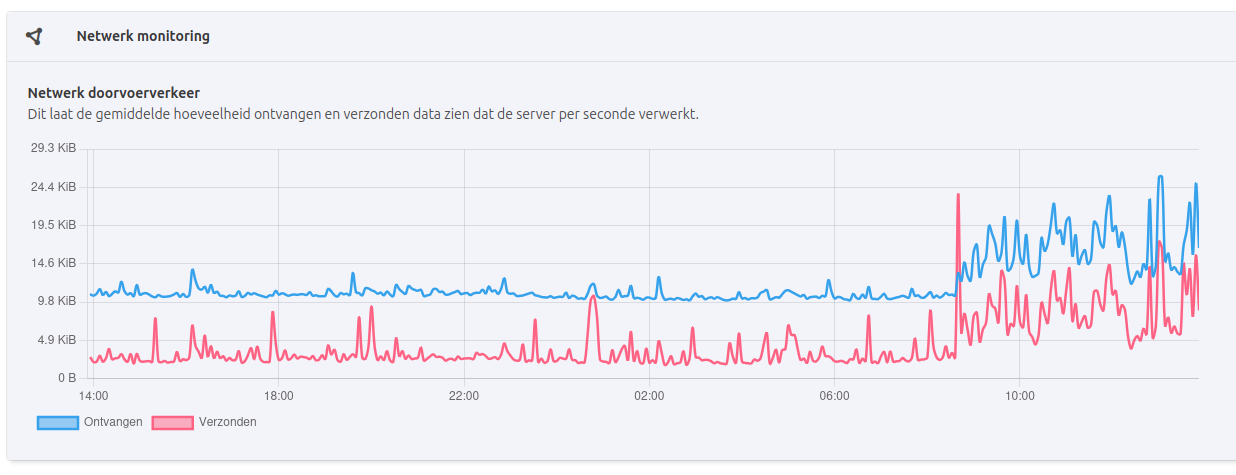
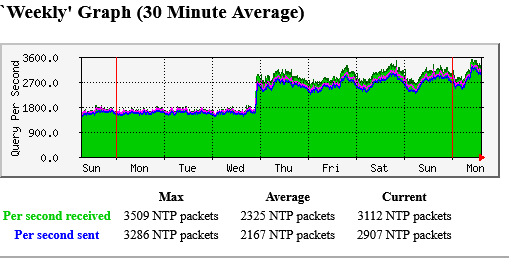
Yes, it is the combined traffic both for IPv4 and IPv6. I set the maximum speed settings available (3 Gbit).
Here it is the page for all the servers that I am maintaining: pool.ntp.org: NTPman's pool servers . The last one is testing only speed, that is a test monitor in the beta pool.
I find it hardly surprising that a server that used to serve only one zone (ch) gets ~double the traffic when another zone (be) gets added. If anything, it tells us that the supply/demand for NTP pool services is similar in Switzerland and Belgium and I haven’t heard of the Swiss complaining that their servers are being hit hard.
Focusing on the NTP queries again. Bas, do you think you are getting too many NTP queries at the moment? If yes, what would be an acceptable NTP query rate per second? If no, there’s no problem, right?
There are a number of factors that are in play when determining if a certain traffic volume is problematic. We all are aware of them (BW, line type and line symmetry, hardware used etc).
for both your servers combined, the share of the overall sum of netspeeds was more than 32% at that time,
the overall sum of all netspeeds was about 18.65 Gbit at that time (assuming yours were both at 3Gbit),
and that based on the current number of servers in the zone (21, which might have been different at the time you took the screenshot), the average netspeed for the remaining 19 servers was ~666 Mbit.
The first permyriad tells you that aggregated over about the last three days, your servers combined were present in more than 26% of DNS responses to requests from the BE zone.
The ratio between the two can tell you that the IPv6 zone for BE is very likely rather well-served now.
Nope, not necessarily true. It depends on the traffic demand in the respective zone. For IPv4 in BE, it would indeed be quite a bit. But for IPv6 it is only a fraction of what one would see for IPv4.
Overall, I think it depends on the number of servers vs. the demand in the zone, i.e., number of clients and how they behave.
E.g., consider the following IPv6 server:
It’s share is even higher than the examples above, but it gets a meager average bitrate of typically slightly less than 15 kbit/s (typically less than 20 packets per second).