I take a big hit in queries

@Ask,

I noticed that my Stratum 1 server takes a big hit in Belgium and WORLD! on queries.

Where my other stratum 2 servers get far less.

All are set to 512K, but my Belgian Str-1 server has a massive higher number of clients.

As you can see, the numbers are pretty high. Why is this server hit so hard?

Stratum 2 servers are not, with the same settings. Something is wrong, as this a massive amount of traffic.

Same server but for France, same 512kbit setting…

It has not even near the number of requests, and 0.0 outside France. This must be a bug in the system. As my Str-1 server should not give global or being overloaded with requests, just because it’s Str-1.

Another problem, you can’t change the Netspeed in Firefox but it works in Chronium. Look like a problem with the web-interface.

Please fix this. Thanks.

Just as the netspeed setting is only relative within the zone, so are the numbers in the “Client distribution” section of each server’s details page I understand from your description you are referring to, and your are deriving your conclusion from.

I.e., a ~12 permyriad value in one zone does not necessarily mean that server is seeing more actual traffic in absolute terms than a server in another zone with a ~0.046 permyriad value for its zone.

Please refer to this thread. My latest work-around:

  • Reload the page
  • Set the netspeed to the same value that is already active
  • Set the netspeed to the desired new value

I hope though this will get fixed eventually.

As far as I can see, there is nothing in the code that would prefer stratum 1 servers over other stratum servers. Whatever differences you are seeing are not related to the stratum of the server.

The number of NTP queries received by your servers would probably be a better metric than the number of DNS queries. I don’t know if you collect statistics, but a very low-tech one-shot method for chrony would be to run:

(chronyc serverstats; sleep 1h; chronyc serverstats) | grep “NTP packets received”

1 Like

Ok, my stratum 1 server:

NTP packets received       : 41775565
NTP packets dropped        : 832081
Command packets received   : 2764
Command packets dropped    : 0
Client log records dropped : 22708763
NTS-KE connections accepted: 0
NTS-KE connections dropped : 0
Authenticated NTP packets  : 0
Interleaved NTP packets    : 14140
NTP timestamps held        : 4096
NTP timestamp span         : 206843
NTP daemon RX timestamps   : 0
NTP daemon TX timestamps   : 40929261
NTP kernel RX timestamps   : 40943401
NTP kernel TX timestamps   : 0
NTP hardware RX timestamps : 0
NTP hardware TX timestamps : 14140

My stratum 2 server:

NTP packets received       : 8795739
NTP packets dropped        : 764719
Command packets received   : 14
Command packets dropped    : 0
Client log records dropped : 458877
NTS-KE connections accepted: 0
NTS-KE connections dropped : 0
Authenticated NTP packets  : 0

Other stratum 2 server of mine:

NTP packets received       : 502552
NTP packets dropped        : 0
Command packets received   : 5
Command packets dropped    : 0
Client log records dropped : 31941
NTS-KE connections accepted: 0
NTS-KE connections dropped : 0
Authenticated NTP packets  : 0
Interleaved NTP packets    : 0
NTP timestamps held        : 135
NTP timestamp span         : 888667
NTP daemon RX timestamps   : 0
NTP daemon TX timestamps   : 502550
NTP kernel RX timestamps   : 502550
NTP kernel TX timestamps   : 0
NTP hardware RX timestamps : 0
NTP hardware TX timestamps : 0

Sorry but all are set 512K Speed, I understand it’s somewhat loose setting, but the difference between them is very big.

Something must be wrong with the speed-setting, as my Belgian server is being hit far more then any other. For now I set all my servers to monitor only. As these kind of load is too high for my line, making my own internet-use almost impossible.

I would expect some telco’s (GSM or so) hit me constantly as it shows massive drops also.

I have 35mbit upload / >85mbit down, so the 512K setting should not affect me, but it does.

No idea what you mean by this.

But I see a lot of traffic and my own home-internet is affected.

I bought a new router to counter this, but it also slows down.

As stated before, I expect telco’s routing ALL NTP-requests to the same DNS-proxy and not buffering NTP themselves, but direct it to the pool.

Meaning when my IP pop’s up for ALL their users, they all hit me constantly.

Only explanation I can give. As it doesn’t happen to my other servers.

Belgium has only 4 real Telco’s, EDPnet / Proximus / Telenet / Orange.

They basically control 99% of the market. Pretty sure they do not care who provides NTP.

I also saw that our star-watch oma.be has stopped their unrestricted access to their STR1 servers.

They setup other ‘buffer’ servers to offload them. I wonder why?

I guess netspeed values below the current minimum of 512 Kbit (256 Kbit with manual tweaks) would come in handy right now…

Consider the following three servers from different zones with the respective share in their “home” zone, all at the same netspeed setting.


Screenshot from 2025-09-29 13-50-38
Screenshot from 2025-09-29 13-50-56
Screenshot from 2025-09-29 13-51-32

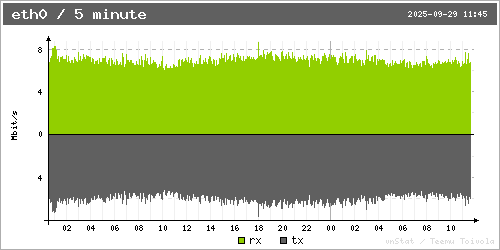
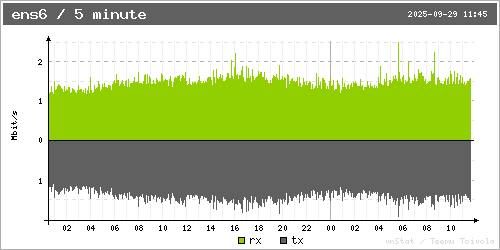
Now guess for each of them which of the following bandwidth usage graphs it matches (the server in the USA has IPv4 only, the others have IPv6+IPv4 in the following figures):


Solution: First graph is for the USA, second is for Spain, third is for Germany.

So while the servers in the USA and Germany have approximately the same share of the overall netspeed in their respective zones, and roughly the same share of the DNS requests from their respective own zone, the one in the USA is seeing roughly six to seven times the amount of traffic of what the one in Germany sees (and that is not even properly discounting that the graph in Germany also includes IPv6 traffic, while the one from the USA does not).

Or comparing Spain with the other two, it has almost six times the DNS request share from its own zone than the other two servers see from their respective zones. Yet, it sees about double the amount of traffic that the server in Germany sees. At the same time, the server in the USA sees roughly about three times as much traffic as the one in Spain.

That obviously does not take into consideration traffic from other zones hitting the server, but that is very much negligible in comparison to the differences between zones discussed above.

The situation regarding traffic from outside the zone is different in other zones, e.g., consider the following server:
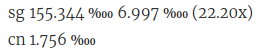
Screenshot from 2025-09-29 14-15-30

The permyriad value for the server’s own zone is about 88 times the permyriad value for the first foreign zone. But looking at the actual traffic, there’s almost eight times as much traffic from China than there is from Singapore. Which isn’t surprising, because 0.01756 % of an estimated 1,022,000,000 Internet users in China is more than 1.55 % of “only” 5,369,000 estimated Internet users in Singapore.

So the point is, zones are extremely diverse, and just because two servers in different zones have the same netspeed setting doesn’t mean at all that they will be seeing the same amount of traffic. E.g., a user from China in this very forum reported that they are seeing double-digit, sometimes even triple-digit Mbit/s traffic with the same 512 Kbit setting that you use. And I guess you do not see 10 Mbit/s or even more of actual traffic on your server in Belgium at 512 Kbit, or do you?

E.g., Belgium currently has about 22 active IPv4 NTP servers, while France has 209 of them.

Ok, you might say, France is bigger, and has more people, so they simply have more servers obviously. But if you compare the number of Internet users (an estimate obviously) per server, then France has about 267500 users per server, while Belgium has almost double that many users per server (approximately 496400). So any other factors aside, just based on those numbers, I would expect a server in Belgium to be hit by noticeably more traffic than a server in France at the same netspeed setting, just because almost twice as many users are potentially accessing it.

To sum up, it doesn’t need the assumption of bugs in the pool’s algorithms to see why a server in Belgium might be hit by much more traffic than a server in France at the same netspeed setting. Though to pinpoint exactly what contributes to that difference is somewhat difficult because there are just so many factors at play simultaneously.

1 Like

I see your point.

But Belgium has only 12 mil people, with 22 servers, compared to France 67 mil - 209 servers.

Germany even 84 mil - 518 servers. So yes you have also more servers.

I understand this, however, I set my server very low for traffic. Yet it’s hit far more then needed.

That is what the speed-setting is for. So the DNS should direct people to other EU-zone servers, but it doesn’t, it directs massive traffic to me instead.

I see this because my German, Netherlands and France servers do not take any Belgium traffic at all.

So the DNS-algorithm has a flaw, it seems to work the other way around, not redirecting traffic to other zone-servers but let country-own servers take big hits instead. Ignoring ‘max speed-setting’.

You explain exactly what I experience, too little amount of servers in Belgium, as such we take all requests instead of it’s being redirected to nearby EU-zone servers.

None of my other servers get EU-traffic….but my Belgian server gets massive requests from…..right Belgium and even other zones. None seems to be offloaded to EU-zone servers.

Do a test:

watch nslookup be.pool.ntp.org

Cloudfaire is taking a lot of requests, as expected.

But all the rest is Belgian servers, not EU-zone or World but Belgian.

In short, all 22 Belgian servers are hit very hard. And rest goes to Cloudfaire.

Yes, but when matching the estimated number of Internet users against servers, then there are still about twice as many users per server in Belgium than there are in France. I guess with number of people (vs. estimated Internet users), that might change, but only slightly.

I think there is a big misunderstanding: As has been discussed at length and in depth a while back, the pool system assigns clients to servers from the same zone only as long as there is at least a single server in the zone. Only if the zone does not have any server in it (considered separately for the two IP address families, obviously) will there be a fall-back to the enclosing zone, i.e., continent. (This is true when any of the “global” names are used. When querying with a specific zone in the name, if the zone has no servers in it, that is how many servers one gets back - none.)

There were various proposals at the time, among them the general idea of what you describe, i.e., fall back to the enclosing zone in some way (various ideas on that) when a zone is considered not having “enough” servers (again various thoughts as to how that could be defined/measured).

Ask himself wrote one or two years back that that is something he plans to do, but has been silent on that front ever since, and various other features have come out since then instead.

How do you determine that? I mean the “than needed” part?

EDIT: I realize that you probably refer to servers being hammered needlessly as ways to prevent that are known.

The speed setting is primarily for sharing among servers within a zone. It doesn’t have anything to do with offloading to enclosing zones. There was an idea a while back to try to make the speed setting more of an absolute setting, rather than relative to the overall sum of netspeeds of all active servers within a zone.

I think the setting is also used for load sharing among servers in a continent zone in some way, but I have yet to figure out exactly how.

There is no clear definition of what some people consider an underserved zone, but one aspect could very well be that a zone may be considered underserved when a server with a typical home Internet connection setup is not able to join the pool even at the current lowest setting of 512 Kbit.

Belgium still is in a relatively good position. Consider what happens when the 512 Kbit setting gets you double-digit Mbit/s traffic, which performance aspects aside (NAT, …) may overwhelm Internet connections in large parts of the world, e.g., DSL lines with only 1 or 2 MBit/s in the uplink direction, or cloud servers with only 1 or a few Mbit/s contractual uplink bitrate, or low traffic volume quotas.

That is why I keep advocating for allowing netspeed values below 512 Kbit. E.g., I have a server in India that is at a 1 Kbit setting (from when that was still possible by tweaking the system), and despite its low contractual traffic volume in this case, it can still contribute to the pool. Not much, but “every server counts”.

Or my server in Malaysia, which has 1 Mbit/s contractual bandwidth for the IPv4 side, but it can still contribute to the pool because of the legacy 1 Kbit setting in this case as well. It isn’t much, either, but again, “every server counts”.

1 Like

Thanks, but that is not good and explains why I take major hits that my line can’t handle.

In my opinion it should change to make all servers handle ALL zones based on their setting.

So take the number of servers of a country, then devide that by the number of DNS-requests from that country and check the average request per server over the EU, World or whatever.

When this number is a lot higher, like mine, add servers from a bigger range to the pool….so BE will then include EU and even WORLD is needed to get it back to the average.

In short, when you see the number, like mine is 10x as high as other, and all servers in BE have a BIG number, EU zone servers should be added.

There are more countries that complain about their server being hit hard.

I did complain before that my server was hit hard, now I understand the reason.

It’s fallback instead of adding zones to meet the average of all servers that are e.g. set to 512k.

If you make an average per setting, you can calculate the needed servers to make it average, as some servers simply don’t serve much, while others are overloaded.

Thanks Magic! I hope @Ask will change the algorithm so I can return to be active again.

For the moment monitor only and my monitors also keep running. But no pool-requests until this is fixed.

I agree totally with you.:+1:

Just extrapolating from past experience, I don’t expect this to get fixed anytime soon. In the interim, if you’re interested and willing, I could share how to reduce the netspeed value to 256 Kbit at least (lower values are being rejected since the monitoring-related updates). Might, or might not be sufficient to get you back online.

At lower netspeed values, the sharing algorithm doesn’t work as well anymore. I.e., the 256 Kbit setting may not get you exactly half the traffic that you get at the 512 Kbit settìng, but likely a bit more than half. But more important than the relative netspeed change translating to an exactly proportional change in the amount of actual traffic is that you get the absolute amount of traffic sufficiently reduced to fall within the capabilities of your setup/equipment.

Ouch. Didnt realize that the changes to the monitoring system caused the ‘'workaround’ for setting netspeeds lower-than-512kbit not to work anymore…

While I dont have similar problems as Bas, having such a workaround (e.g. setting to 1kbit/s) handy was my isurance policy in case my servers were hit hard and started to clog up my home internet connection.

@MagicNTP Could you please at least share your workaround for setting 256kbit/s? Thanks!

If it can’t be fixed, I can’t join the pool with my servers.

I do run 2 monitors, they keep running, I thought before they where the problem, but their load isn’t too high.

It’s purely the ‘NTP-DDOS’ on my Chrony that causes problems.

I do not understand why it’s so hard to set limits to DNS requests. Just set a counter on the NTP-server-IP, when requested 512000req it stops serving or slows-down in req/sec.

Big servers like cloudfair should be able to set unlimited as max, that they get all requests when small servers are maxed.

Same with EU-zone, when not maxed, take Belgium load as well.

I mean, change the Speed from kbit to req/sec (or minute) and let it count, then check how fast it counts and divide that to req/hour and regulate the DNS according to being listed or not.

When e.g. Belgium is maxed, add EU servers.

Kbit is hard to do, but requests shouldn’t be, as every request just adds to the counter.

Average the counter after 1 hour/day and then serve according the expected number of requests per second.

Give servers a settings of x requests minute/hour…then count and average. Do I still make sense? :upside_down_face:

All in all, a counter on e.g. 10000 Server-IP’s isn’t to hard for a database to change a counter.

@Bas Yes, you still make sense :grinning_face: This might be a possible solution.

Another one is to be more flexible with the zone/region assignment. Many server operators are well aware of underserved zones and might be happy to help out by shifting a server from an overserved zone to an underserved one. However, currently server operators cannot manually change zones… Over the years I have made several requests of this nature and have been ignored every time.

Bas, your problem isn’t the bandwidth. Your problem is that you are doing NAT on your router. You have been here long enough so you should know that NAT may cause issues.

The point of my previous “chronyc serverstats; sleep 1h; chronyc serverstats” command was to get two measures of sent packets so that the delta could have been divided by 3600 to get the average queries per second over one hour. A shorter interval could have worked as well. But this point is now a little bit moot now that your server has been set to “monitoring only”. The average rate would have given us an exact value of how much queries you are actually getting. My worst case guesstimate would be around 130 queries per second when a Belgian server has been configured with a 512 kbit/s netspeed setting. 130 qps is honestly not that much bandwidth-wise. NTP packets are only around 100 bytes.

I believe your Internet connection is VDSL so you will need some sort of a modem, like the one you have now. However, if you configure it to “bridge mode”, disable its firewall and NAT, and assign the static IP address you have to your NTP server instead of the router, it is likely that your setup would handle much higher query rates. You would probably still need to assign some 192.168.x.x address for the router for management purposes.

If you have multiple IP addresses available (like a /30 subnet), you can assign one IP address to your NTP server, and the other IP address to some other router that does NAT, both behind the same bridging modem. This other router (like a regular wifi router without VDSL features) could handle all the other devices in your home network. This is only one example, there are other ways to achieve similar results. You will need to take care of firewall issues one way or another, though.

I will use PFSense to see what happens.

However, I never expected the Netspeed setting NOT to work.

I mean, 512K setting should not affect NAT as the traffic is far too low.

The routers that I’m using should be able to handle that with ease.

Yeah I’m using VDSL and tested many ways. DrayTek, Fritzbox 7590, 7530, 5690Pro and Zyxel (bridge mode), you name it.

I have just 1 IP-address. But I will try to use NTP on the public IP instead of behind NAT. By moving the NTP-server into the router itself. Maybe that works, I hope so.

Let’s see if that works….hope so. Luckaly I do not have a traffic-limit on my subscription :rofl:

Yes, good thinking, making the router itself answer the NTP queries would probably help. However, I’m afraid the router might support serving NTP only on the LAN side, not WAN side.

As for having a single IP address – back when I still had a VDSL link at home I had a strategy to configure the modem to be as dumb as possible, ie. it would only convert the VDSL bits to Ethernet bits and nothing more (bridge mode). I then placed a more capable Linux box with two network interface cards behind this bridge. One NIC had the public IP address, the other a 192.168.x.x address. The internet-facing services were running on the Linux box itself. This server also acted as a NAT gateway for my other devices in the 192.168.x.x network. This approach gave me much more flexibility in configuring the routing to my liking. Maybe something similar could work for you.

Ok, the first ones didn’t work with GPS.

Next try OPNsense, that tells me it supports GPS and PPS too.

I have a small box called Advantec Ark-1124, it’s perfect for the job and has 2 NIC’s.

What you describe is exactly what I was planning to do…the Fritzbox will be behind the Ark.

Zyxel (dumb-bridge mode) → ARK with OPNsense - NTP Public-IP →Fritzbox in ARK-NAT doing the rest.

Fingers crossed :smile:

Doesn’t work either as it won’t support Vlan DSL.

Have to wait until next week as I’m changing provider, hopefully the new one doesn’t use VLAN.