Both my Pi NTP servers are in a glad storage box and using still air (bubble wrap) as the insulator. With them being an my basement the temperature is very stable and only seasonally goes up or down. When I first set them up years ago I read many articles on how temperature effects the clock cycles in the Pi CPU.
But this person did some great work with setting affinity of the applications and provided very solid documentation.
1. CPU core isolation – Dedicate CPU 0 exclusively to timing-critical tasks (chronyd and PPS interrupts)

2. Thermal stabilization – Keep the other CPUs busy to maintain a constant temperature, preventing frequency scaling
Point 1 works, it does, as it prevents the program to hop from core-to-core, so core isolation DOES work well.
However, no 2 isn’t correct, you do not need to keep the CPU busy to maintain a constant temperature when the CPU is set to maximum performance. It will automatically stay warmer because of the higher CPU speed in MHz.
However, when you keep the CPU busy, you will drain the Cache of the CPU, making it access memory more often then needed. That could explain the more stable timekeeping.
As a cached drained makes the CPU go directly to the memory instead of checking cache first.
And thus saves time as other devices can write directly into memory but not in cache.
Just my idea on why it happens. But yes, core/program/locking is a good way to stop core-hopping.
I use this a lot for real-time programs where raw-response-speed is crucial. However, it only works on slow CPU’s, high-end CPU’s are by far to fast to make a difference.
Also, ARM CPU’s do not have hardware IRQ’s, where AMD/INTEL’s have it, so you can force the CPU to pay attention. This was also a problem for Sparc systems in the past, the lack of IRQ’s.
On the other hand, hardware IRQ’s could crash Intel systems when abused
2 remarks:
I would not lock it to core-0 but a higher core, best the highest one, typical most things are handled by default by core-0 and not other.
If you keep the CPU busy with the same exact work, the CPU cache will fill with the work it’s constantly accessing. It doesn’t keep reloading the already cached data, unless your accessing more program data than can fit in the cache. That’s what CPU cache (and cache in general) is for, keeping the most frequently accessed data in a faster ram (CPU cache ram) to reduce latency from having to use slower system ram or storage media to get the data. THAT is what helps to keep more stable timekeeping, as there are is no need to waste more CPU cycles (added latency) to fetch the data that is unavailable in the CPU cache.
In a Raspberry Pi (at least for 3 and under), locking the CPU speed helps to prevent delay as the CPU isn’t constantly having to ramp up in Frequency to perform the work its asked. I think it was somewhere around 3-4ms of time needed just for a CPU core to go from idle to full speed on the Ras-Pi. For timing purposes, this helps reduce delays which can show as your offset constantly fluctuating. I think they may have just worded it incorrectly in thier statement, as the “frequency scaling” has to do with the system CO.
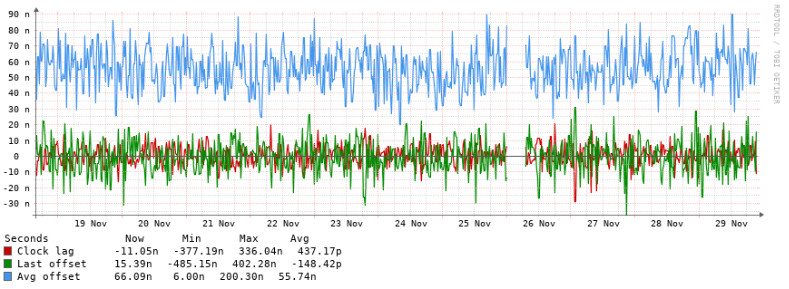
What can also keep the offset constantly fluctuating is a unstable system clock, which is controlled by the Crystal Oscillator (CO). It is not a TXCO (Temperature Compensated Crystal Oscillator), or better a OXCO (Oven controlled crystal oscillator), and it’s frequency is easily affected by outside factors, not to forget it’s also a cheap CO. I believe its only a 10% CO (maybe 5%), meaning that even at it’s best, the frequency can be off by up to 10% from its rating. In order to try and mitigate this frequency fluctuation, keeping the temperature constant of the CO can help, and the CO is installed on almost the direct opposite side of the CPU on the board. Keep the CPU at a specific temperature, and the CO will also be at a somewhat constant temperature, and keep a fairly stable frequency. So yes, that is correct. You can see from my own chart over a month how stable the PPM for my Ras-Pi is. I use NTP Heat to do so, and you can see from own chart and the charts on the site I just linked, just how much time keeping on a Ras-Pi can be affected by heat. The dip in the middle is when I raised the set temperature to keep from 45C to 50C, as well as switched from 4 threads to 3.
You dont see the fluctuation on my chart because NTPHeat is running. If it wasn’t, the PPM, and in effect the system/CPU clock, would be all over the place, just like the before and after charts in the link I provided.
Unstable system/CPU clocks = Unstable time.
The link goes into alot of detail about that in some of it’s other pages where the author is trying to get as stable a time as possible out of the Ras-Pi. I’m surprised they didn’t go down the surgery route and swap the CO for a TXCO. I was actually thinking of doing the same myself, but I really have no need for such an accurate clock (it’s accurate enough even with just a normal GPS module), and even a TXCO is limited in what it can do in the environment my Ras-Pi would be in.
Here is another link about NTPHeat affect: Raspberry Pi NTP Server - Part 6
Lots of good info in that link as well as the author did alot of testing at various steps along the way of making a dedicated Ras-pi NTP server.
I know the clock change is a problem on tiny CPU’s.
However, in order to make the clock stay stable at a certain speed, all you have to do is install cpufrequtils and edit the min-max clock speed to the same and performance.
Then the CPU will run at that speed all the time and doesn’t lower or higher the speed.
As for the oscillator, it makes no sense to install a more precise type, as it’s frequency is much higher then the data is processed by the CPU and the precision of a GPS isn’t high enough.
Why not run just 1 core for Raspbian, 1 core for NTP and all the other cores run CPUburn:
That will heat the CPU to the max, combined with the min/max CPU speed, it should stabilize to the max.
But if I remember correctly, the ARM CPU used in the Pi’s will slow down when it gets too hot, no matter what you do. Not sure if older Pi’s do the same.
In fact, you should cool it to counter this….but then, I could be wrong. I haven’t touched my Pi4 for more then a year. I found Intel NUC’s use the same amount of energy and work far better.
The main system XO (Crystal Oscillator) is what controls the system clock (not time) frequencies. Everything on that system, is based off the XO, including the frequency that the CPU runs at. What you keep thinking about is a clock speed multiplier. Since the XO doesn’t run at the speeds a typical modern CPU can run at, the clock speed multiplier takes the XO speed, and multiplies it to a speed the CPU is rated to run at. In the case of a Raspberry Pi 3B+, the XO runs at 19.2MHz, but in stock form the CPU can run at up to 1.4GHz. By setting the clock speed on the Raspberry Pi, you are effectively setting a multiplier based on the XO. This is also how we used to overclock CPUs back in the days of the 386/486/Celeron/Pentium, move a couple of dip switches/jumpers on the motherboard to change the XO speed, or just switch out the XO itself.
XO * Multiplier = CPU clock speed.
Because the XO is just a plain old XO, it’s frequency can vary greatly because of it’s shortcomings, one of which is being easily affected by temperature, which in turn affects the actual CPU (and other circuits of the Ras-Pi that rely on the XO timing) clock speeds. So yes, you could lock the “clock speed” on a Raspberry Pi to its maximum of 1.4GHz, but in reality, its not running at a consistent 1.4GHz, but only “around” 1.4GHz, and it’s constantly varying. Unstable clock speed of the CPU = unstable timing in NTP/Chrony. It has nothing directly to do with the GPS itself, but it does affect the precision of the software being used to get as precise a time as possible.
There’s a reason why a Lab grade 10MHz Frequency Reference generator can cost multiple thousands of dollars/euros. Double Oven Crystal Oscillator in this one (OCXO). And I just realized I kept using CO instead of XO for Crystal Oscillator.
Because you don’t get stable temperatures if you just run the core(s) at 100%. Hence the need for a program to monitor the temperature and stress the CPU enough to keep the temperature at a consistent level, so the XO also stays at a consistent temperature which makes everything timing related more stable.
In your own words, “Sorry wrong”. The 19.2MHz is the frequency of the XO, not the PLL. The PLL circuit (aka Phase-Locked Loop circuit, aka the clock multiplier), will take the frequency of the input XO, and multiply that base frequency to a higher frequency for other circuits to use as thier base frequency. This is how a computer can have different circuits (components) of the system running at thier own clock speeds from one single base XO (crystal oscillator). And as you yourself even say…
Yes, everything is based on the XO, as I’ve said multiple times, and even here you yourself say. I don’t understand why you state the same thing I’ve been posting, yet in the next sentence continue to argue against it. If the XO is running at 10MHz, and you multiply it by 10, you get a 100MHz frequency. If the XO frequency fluctuates (for example because of a change in temperature…), and it’s now at 10.01MHz, the average PLL circuit isn’t going to change its multiplier to maintain the 100MHz output, it’ll still multiple it by 10 and you’ll end up with a 100.1MHz frequency. The PLL circuit is just using simple multiplication (or division in some cases) to output a requested frequency, based on the input frequency. If that input frequency changes, so does the output. Those fluctuations in frequency of the cheap XO on the RPi, will also lead to CPU clock speed fluctuations. For code that needs to have a very stable frequency for timing purposes, like NTPd and Chronyd, those constant fluctuations in the clock frequency can lead to constantly changing results in the calculations they run to try to get an accurate time. You end up with a constantly drifting time because of a constantly drifting frequency.
You, who are a HAM operator and hosting a SDR server, should know the affects a cheap XO can have when having to deal with drifting signals on the receive end. Which is why the “better” SDR units have at least a TCXO to minimize frequency drift.
Still don’t believe me about temperature affecting the RPi XO, or how bad the XO on the RPi is for timing purposes? Here are another pair of posts to go through that basically reiterate the same data and findings the previous links I’ve posted also show. You did go through those links, right?
I was even going to use this particular posts method to switch out the XO to a TCXO on my RPi when I was considering adding mine to the NTP pool.
Since you don’t want to believe me either about changing XO, or even how overclocking used to happen on older systems, and how the XO is involved with said overclocking, here is yet another link showing what we had to do back in the day. And yes, this was a different process depending on the motherboard itself. As I said previously, Dip Switches, or even Jumpers accomplished the same function that are now available in the Bios/UEFI in modern systems for changing the multipliers (or divider) in the PLL. It’s the equivalent of going from a Analog physical control, to a Digital function in code, but the underlying hardware (PLL circuit) is still there.
I existed long before Linux, and even the 8088 you mention. I most certainly knew of both. Yes, I know of TurboLinux (never had a inkling of using it so I only know it by name) as well as OS/2. I have used Red Hat Linux back in the day, including OS/2 Warp back when it was first released. I’ve used various clones of DOS, including DoubleDOS. I’ve used Fidonet back in my days of scouring local BBS’, thoroughly enjoyed killing time playing L.O.R.D. and The Pit, especially on those BBS’ that had add-ons that expanded those games functionality, along with other BBS door games I’ve long forgotten. Even tried running my own BBS via Renegade since the 2 most popular hosting software of Wildcat and PCBoard and the various doors (games) were priced too high for just a simple hobby of trying out new stuff. Your doubt is very unfounded.
I’m not treating you like an idiot. But when your posts continually come off in a pretentious manner, I will respond the same.
The Crystal is fixed, sure it changes a bit when temperature changes.
BTW, I ran QuickBBS, Binklyterm, Searchlight BBS (later) and the most used game was Trade Wars.
All the stuff was free of charge and ran under OS/2 1.3 on a 286MHz with 2.5MB ram with Dual-screen VGA+Mono so I could use my machine at the same time.
Later switched to OS/2 2.0 when it arrived, never liked Warp3 is was unstable and poor, Warp4 was far better. Heck I was even the OS/2 dealer/distributor for Belgium
However the clocks in those days had fixed dividers, so upping the PLL output would also change memory and buss speeds. Sometimes it worked, not always.
Anyway, what I tried to say, the RPi has a thermal throttling and other factors like the last reply also states.
You only change the CPU-clock a tiny bit, but it’s corrected by the PPS-signal when you keep the CPU-speed as stable as possible. Same happens with the CPU-speed changes on an Intel.
BTW, it may sound strange, but most SDR’s and Ham transceivers do not have a TCXO unless you buy high-end like the Kenwood TS-890/990, the 590 doesn’t have it.
Kenwood also stated that for most people it will bring nothing.
Same with the RX888MK2, it’s pretty stable, but some feed it with a Bodnar GPS locked 27MHz to make me it more stable. However, I never noticed much drift in a DDC-sdr.
I’m just saying that PPS is already making your clock more stable, I doubt exchanging the crystal for a txco will do much good.
But hey, do it and show me wrong. Always keen on learning something new.
BTW, how Maasbree made their SDR more stable:
You could do the same with the Pi, feed it with a Bodnar….but won’t do PPS about the same? Correcting the drift? As far as I’m aware, chrony does.
Personally, I would cooldown the Pi and keep it cool. But that is harder to do then warm it up.
When I build my new NTP server on a Pi about a year ago, I actually came across this guy and tested a few of his suggestions myself.
I ended up using NTPheat to keep it at a constant temp, but also learned that I needed some baseline cooling in order to keep it’s environment stable enough to completely benefit from it.
In my case, I’ve added a fan on top with variable speed to cool ~10-15c and then use NTPheat to keep it at 58c - this works best in my environment.
In summertime, i crank up the fan a bit to keep my working area in the ~10c range and still be able to keep 58c.
Improvement on stability was far most on the temperature, compared to pinning it to cores and all the other interesting improvement points he is suggesting.
Unfortunately I only keep 1 year of stats, and since my tests were further back, I don’t have the stats anymore from them, but I remember they were quite significant - ~50% improvement of stability.
Note: The current spikes and gaps in the graphs are due to a software update + reboot and a recent LibreNMS bug in the poller. So not related to the stability of the timekeeping.
That is why I do not like ARM-cpu’s for timekeeping, anything you do it starts spiking.
With RS-232 and hardware-IRQ this is a lot less on an Intel. I never understood why only Intel/AMD use hardware-IRQ’s, but now it makes sense ever I jouned the time-crowd
In the days of slow Intels compared to Sparc, Mipsel, Arm etc, those CPU-boards where a lot faster then anything Intel had to offer. I even played with an Alpha 64bit system at the time, it was a joy compared to Winslows. An university lend it to me as they moved to newer and faster systems.
Even the Irix on the SGI machines ran better. Always nice to have friends at univ’s that lend (at the time) very expensive machines to play with
BTW, at the time I told people that one day those RISC machines would take over, everybody called me stupid, today everybody uses them all the time.
Depending on the material in use of the XO, the XO frequency can change by alot. The RPi 3B+ is said to have a XO ranging anywhere from 20PPM to 50PPM (they use whatever parts are cheapest and available at the time of manufacture). If we use the worst case of 50PPM, that means that the CPU frequency of 1.4GHz can vary by as much as ±70kHz. That may not seem like alot, but (if my maf is correct) every cycle @ 1.4GHz is 714ns. A stock RPi 3B+ could fluctuate about 100ms in its time keeping, just because of the cheap XO used on it. Every second.
I think I now see where the disconnect is.
When you lock the frequency on a CPU, you are not loading the CPU as well. You are simply having the CPU process data at that locked frequency. It does not load the CPU at 100%. You can lock the RPi CPU @ 1.4GHz, and it can still idle away, using little to no power, therefore producing little to no heat. The python programs the OP uses in thier setup, as well as NTPHeat that I have linked, is what actually places a load on the CPU, which in turn causes it to heat up. Those scripts both monitor the temperature probe in the CPU, and only loads the CPU enough to reach and maintain the set temperature. Since the CPU die is on the opposite side of the board from the XO on a RPi, we get a really crude, but effective, stable temperature control of the XO, much like a TCXO would. There will be no thermal throttling so long as you set an appropriate temperature.
The PPS signal does not correct the CPU frequency. It has nothing to do with the CPU frequency. The PPS signal does not “keep the CPU-speed as stable as possible”. The CPU frequency is controlled by the frequency output by the PLL circuit, which again is derived from the system XO. The CPU plods along at its own frequency, independent of the Unix epoch time it is keeping track of, but can still affect said time if the CPU frequency itself is not stable. NTPd and Chronyd will base thier adjustments to the system Unix time clock, based on the results it gets from the CPU. If the CPU frequency is unstable, the results will be as well, leading to NTPd or Chronyd constantly having to make large adjustments to the system time clock. The more stable the CPU frequency is, the less adjustments NTPd or Chronyd need to do.
Both considered bottom/garbage tier by SDR “elitist”, yet still always recommended to newbies who just want to try out the SDR hobby because of how cheap ($€) they are for the performance they have, all current models have a TCXO. Plenty of others cheap SDRs with TCXOs as well, though quality is still debatable between the different models (NooElec claims 0.5PPM on thier models, RTL-SDR claims 2PPM, and 0.5-1PPM once warmed up). The RSP1B considered mid tier, also claims a 0.5PPM TCXO, and being able to correct to 0.001PPM.
IMO, Kenwood are just cheap bastards getting by on thier name and milking thier customers by charging big $$$/€€€ extra for parts that cost pennies, and that other manufacturers include in comparable models as standard, like a TCXO.
See, now I know you haven’t bothered looking at any of the links I provided, some of which clearly do show the difference.
I’m done with this thread. If anyone else wants to chime in, please do so, cause he obviously isn’t even bothering to take anything I’ve stated into consideration.
I did look at all of them.
Where do you get that I didn’t?
I wish you tried those RTL’s yourself, they are so off freq that the TXCO only keeps them a bit stable, but their offset-frequency is terrible.
I have run them when I started, they are horrible.
SDRplay RSP’s are a lot better, so is the Airspy Discovery, but then, they cost well over 150 euro.
Their crystal is far more precise.
No a PPS doesn’t correct the CPU frequency, but it can/will correct the system-clock, as such time keeping will be correct, even when the PLL-output is a bit offset.
Weird how you keep twisting stuff. A TXCO only stabilizes a PLL a bit more. I never said PPS will correct the CPU-clock, that is what you are saying.
I said you need to keep the CPU-clock as stable as possible, then PPS can make your clock (system-clock) stable. Of course it can’t alter the crystal and pll.
But you act like a TXCO is the magical thing, it’s not, it’s just a crystal being temp controlled, however crystals have deviations, and you have to correct them by hand to make then MHz-correct. A bad made crystal will still be off-frequency, more then a good made crystal.
There are websites about this. Temperature does help, but it’s not a magic-want like you keep saying.
But in the end it doesn’t matter as your CPU can’t hold perfect time anyway, else we wouldn’t have NTP-pool to correct al systems, now would we?
The Crystal MHz multiplied will only make the offset/error bigger, as TXCO won’t help you there.
Making the CPU itself tick stable does and Chrony can correct the system-clock, so the error can stay small.
Like Windows, a Pi has a terrible clock to keep ticking right, no matter if you go TXCO.
Ever checked Cmos tickers? They are in fact better then Windows is