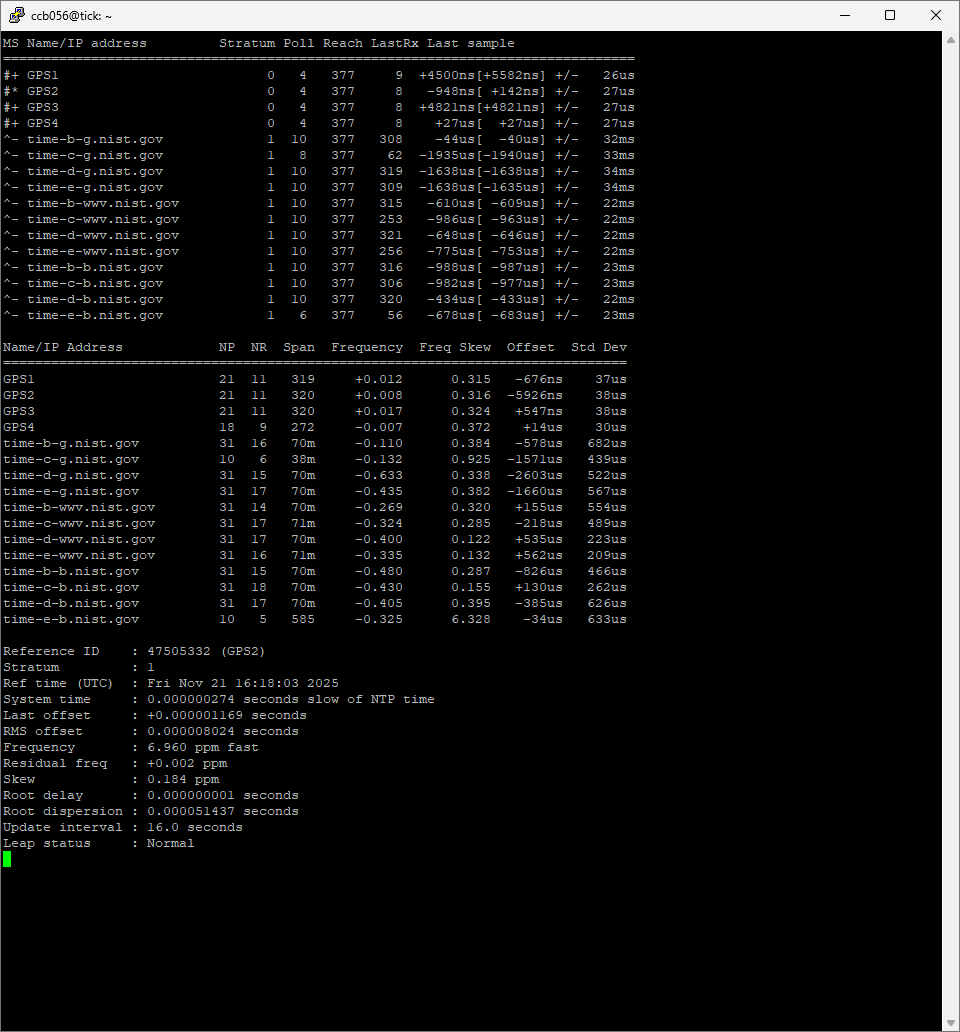
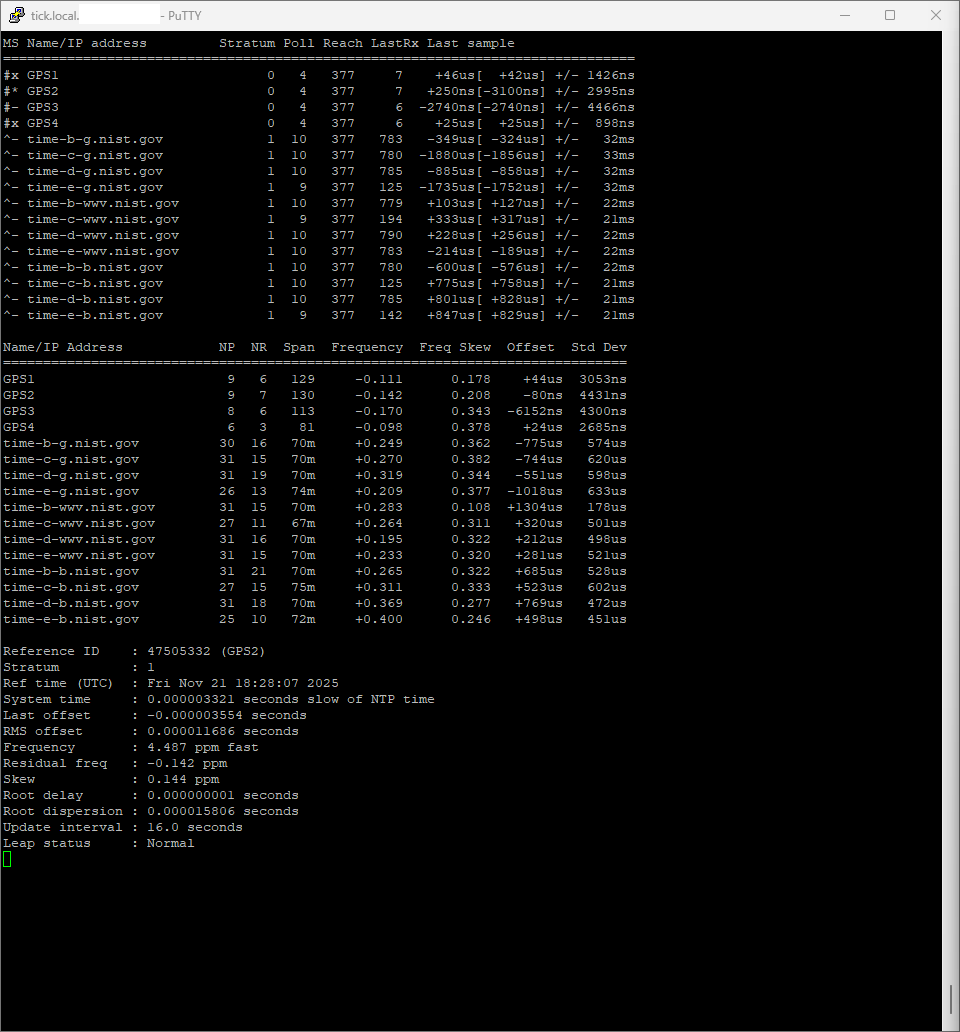
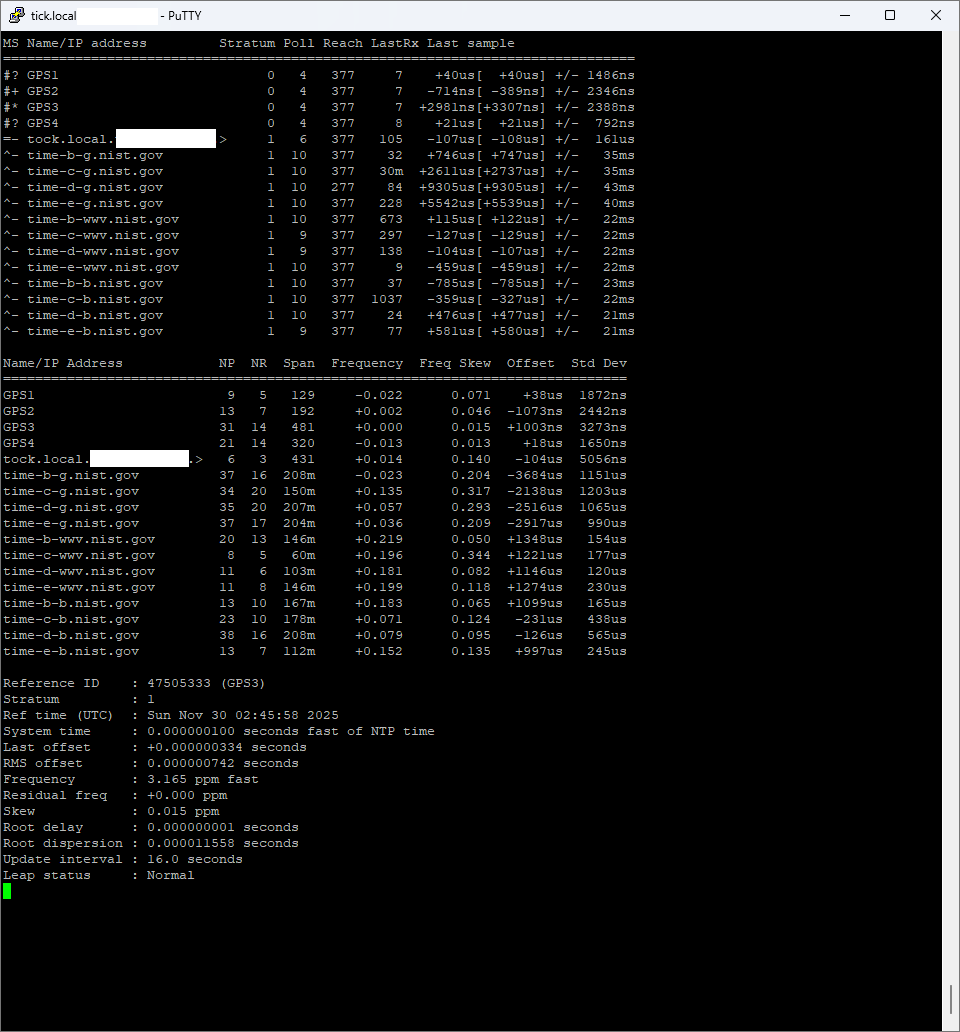
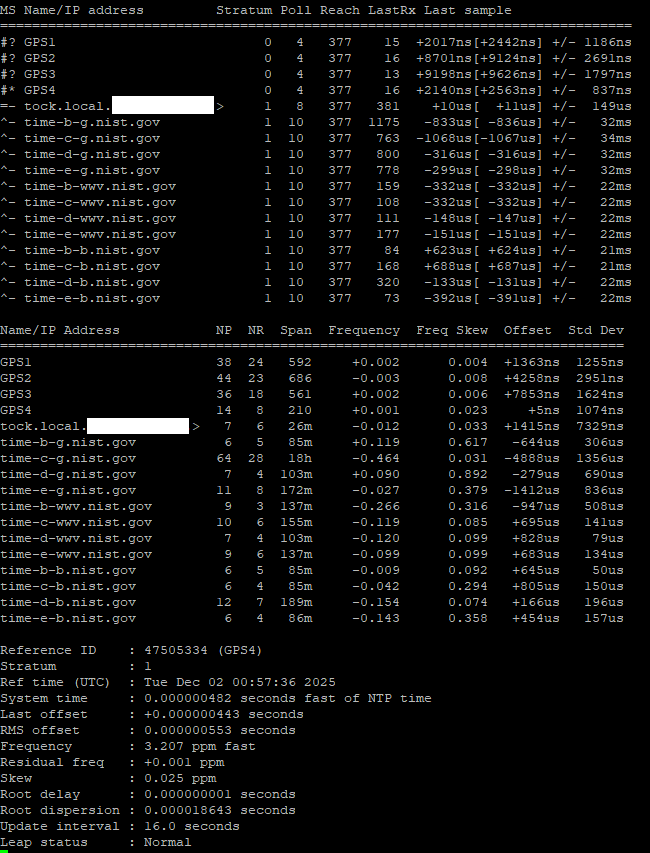
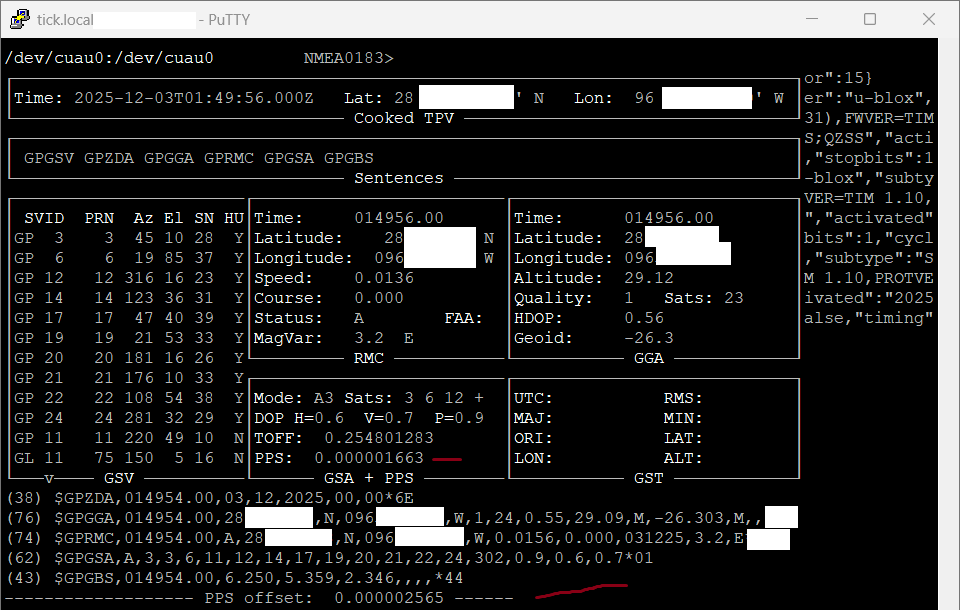
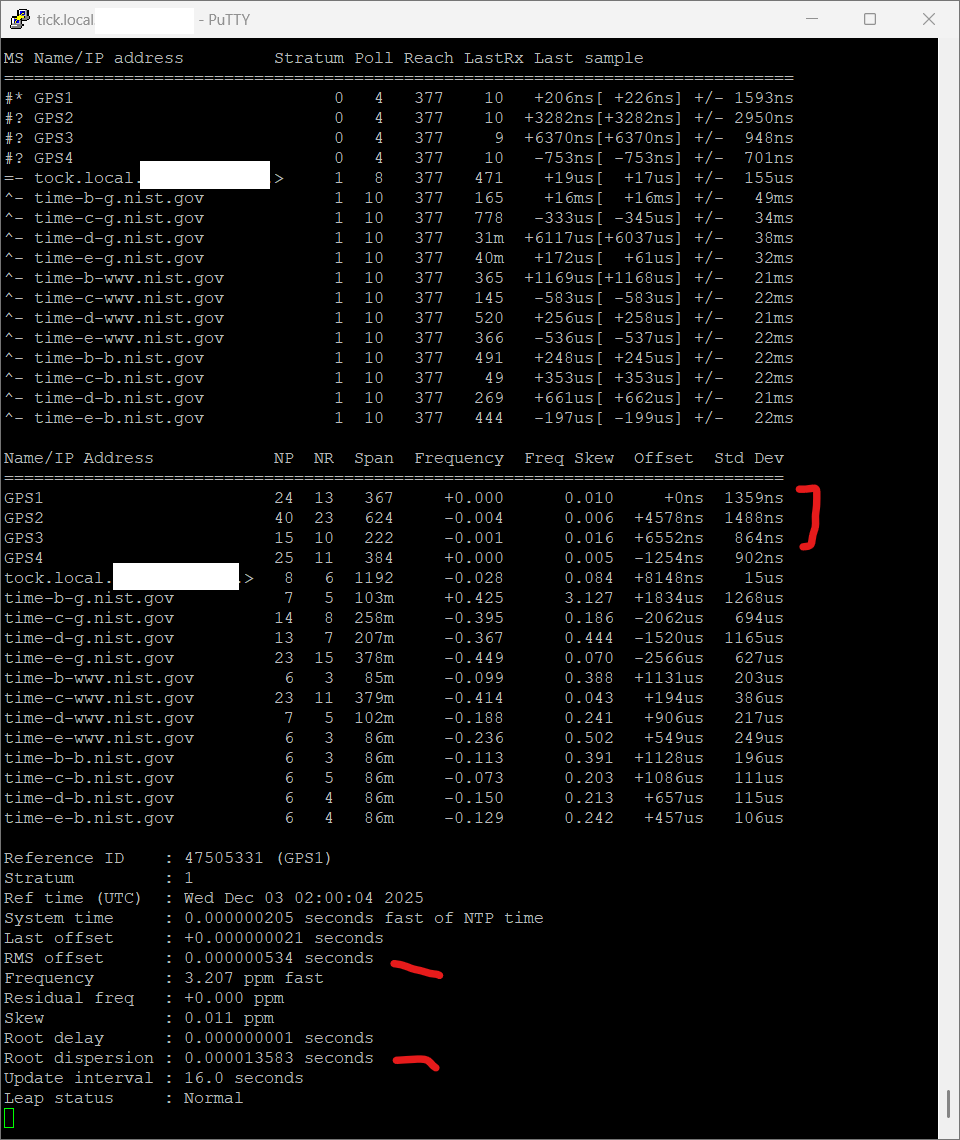
I noticed that on the same machine, with the same configuration, Chrony has much higher/worse estimated error and standard deviation for GPS clocks when run in Linux/Ubuntu vs FreeBSD
I suspect it’s a difference in power saving. See the graph of the PPS-on-serial server on the chrony examples page.
You can try limiting the CPU from reaching higher C-states or disable them completely by booting with the idle=poll option. You could also try running some process that will keep the CPU busy (e.g. openssl speed in a loop, or cat /dev/urandom > /dev/null).
As this is a value how much time it takes to get the values from the source.
This has no impact, as you correct this with offset parameter.
Also the default Linux kernel is not a realtime-kernel, try changing to those and the timing can become better.
BUT when you look at RMS-offset you will see that Ubuntu does a far better job in time-precission.
The question you should ask is this: How consistant is the deviation?
I tested with several GPS on a tiny Intel Dual 1.1 GHz system, and just login ssh already made the GPS-PPS jump up an down 1000ns! As the RS-232 polling wasn’t consistant like it is on my 4 core 2GHz Intel machine.
I also noticed that using SOCKS / SHM / PPS makes a big difference from machine to machine.
On fast CPU’s SHM works better then PPS-signaling. Never got SOCKS to work.
SHM seems to work best for me:
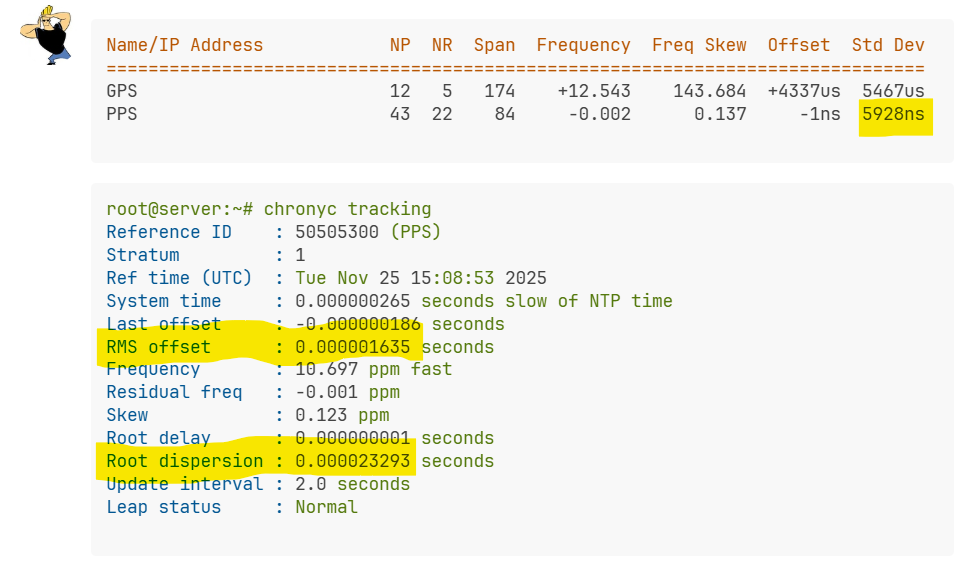
Name/IP Address            NP  NR  Span  Frequency  Freq Skew  Offset  Std Dev
==============================================================================
GPS                        12   5   174    +12.543    143.684  +4337us  5467us
PPS                        43  22    84     -0.002      0.137     -1ns  5928ns
root@server:~# chronyc tracking
Reference ID    : 50505300 (PPS)
Stratum         : 1
Ref time (UTC)  : Tue Nov 25 15:08:53 2025
System time     : 0.000000265 seconds slow of NTP time
Last offset     : -0.000000186 seconds
RMS offset      : 0.000001635 seconds
Frequency       : 10.697 ppm fast
Residual freq   : -0.001 ppm
Skew            : 0.123 ppm
Root delay      : 0.000000001 seconds
Root dispersion : 0.000023293 seconds
Update interval : 2.0 seconds
Leap status     : Normal
And this is my main-server:
vendor_id	: GenuineIntel
cpu family	: 6
model		: 55
model name	: Intel(R) Celeron(R) CPU  J1900  @ 1.99GHz
stepping	: 9
microcode	: 0x90d
cpu MHz		: 2416.666
I was also thinking it could be some power savings or dynamic cpu clock speed setting in ubuntu, I tried playing around with some things… like setting governor to performance, but nothing I tried seemed to make a difference. I may go back to doing some more testing in ubuntu, but for now I’m using FreeBSD.
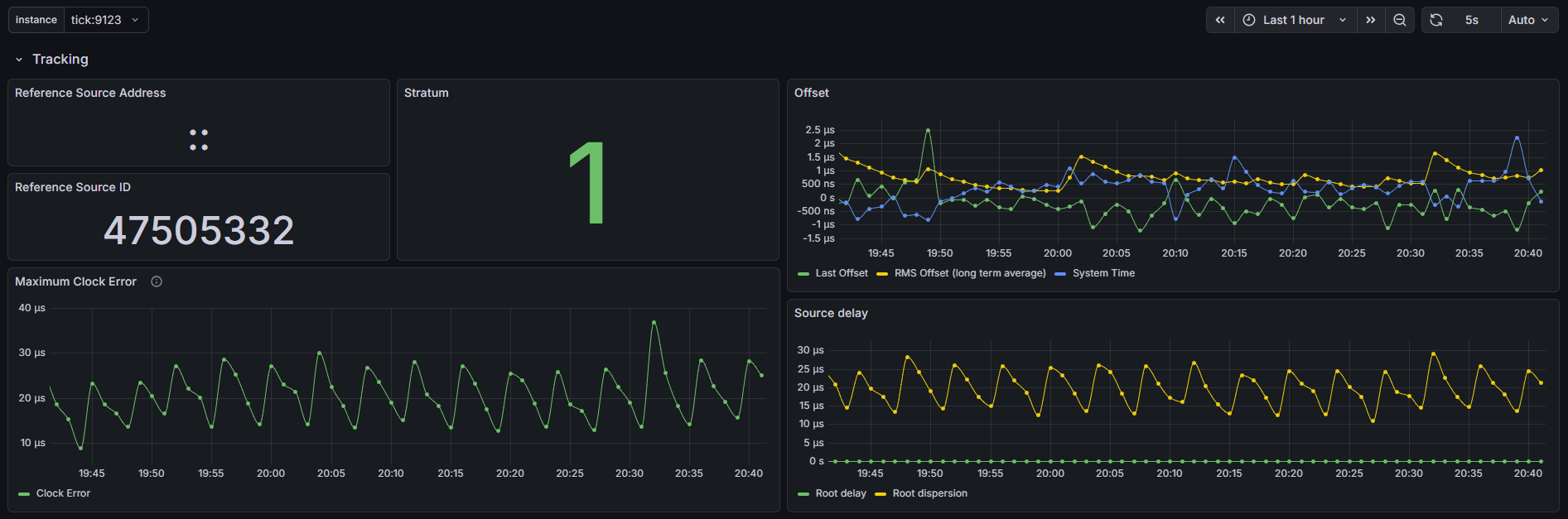
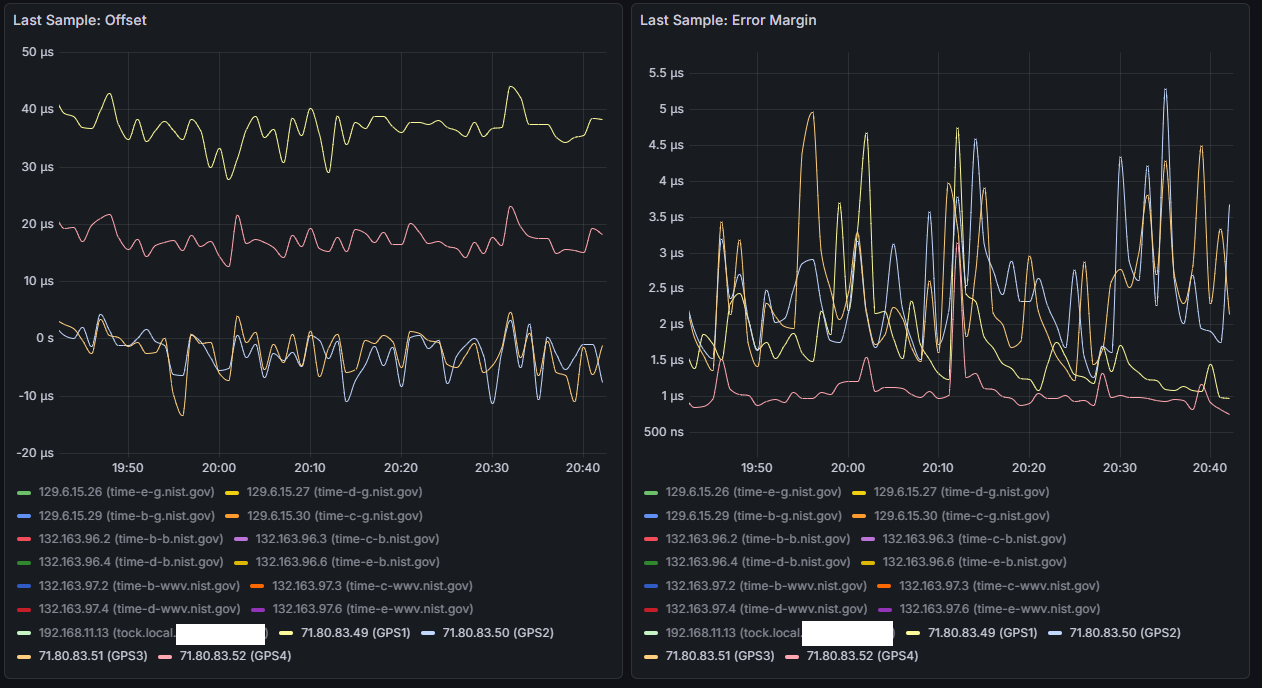
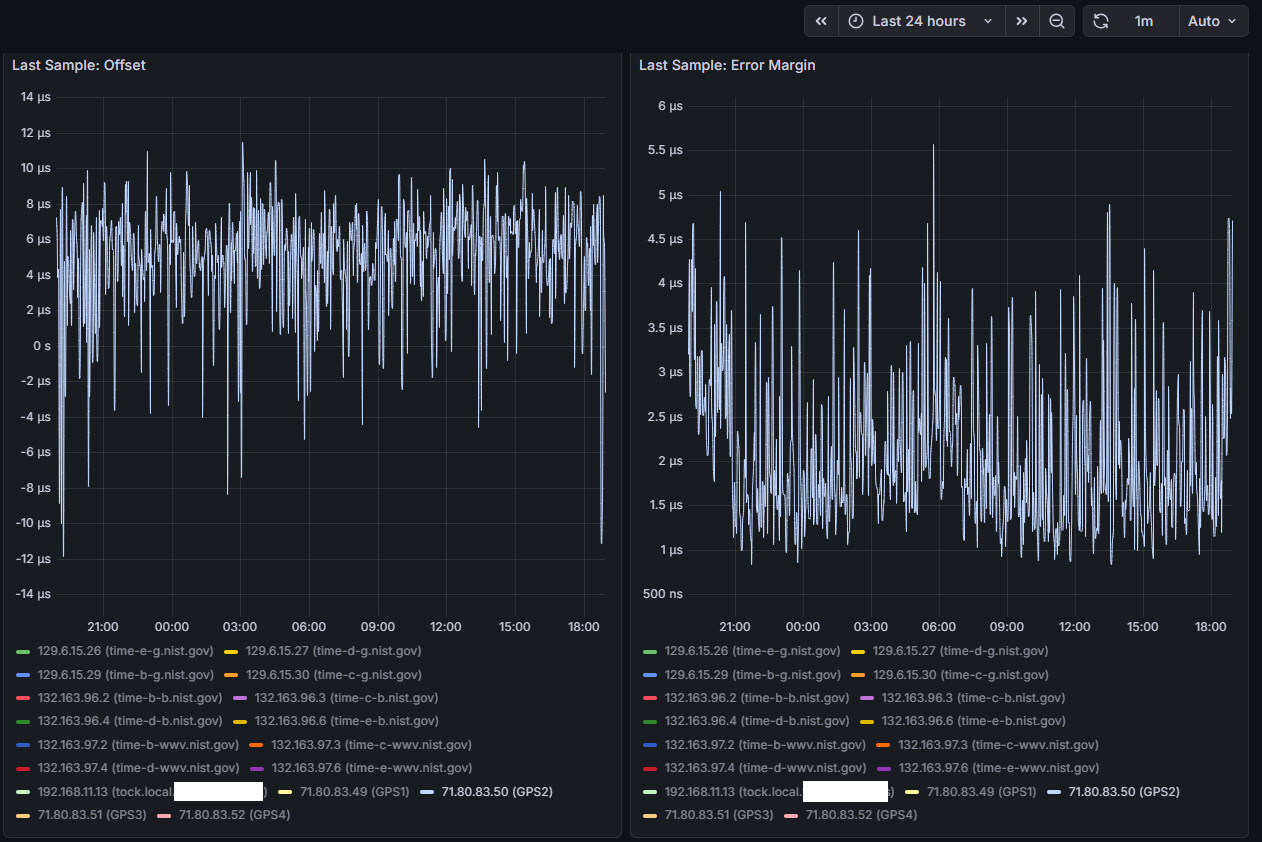
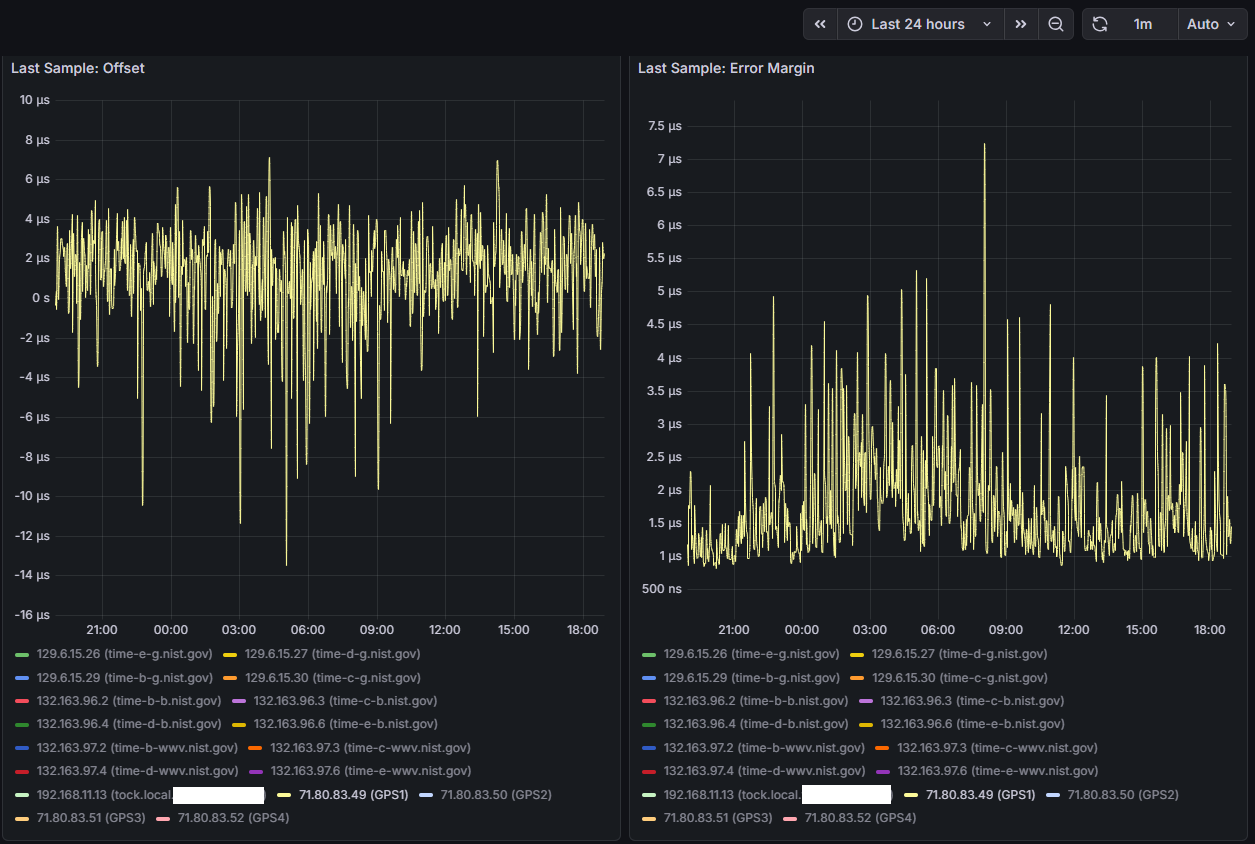
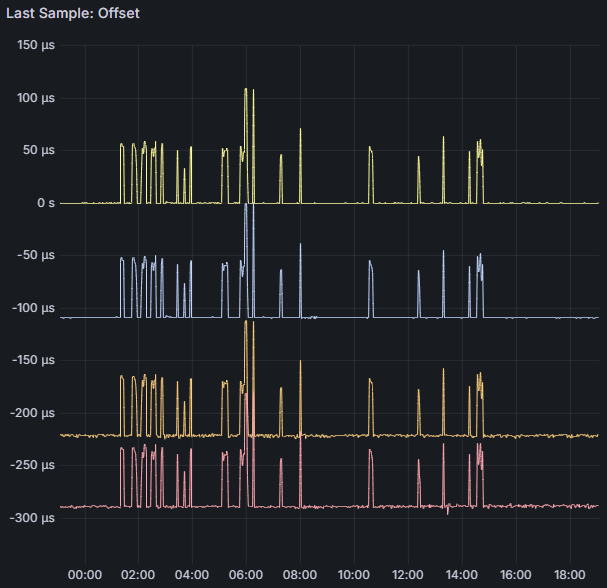
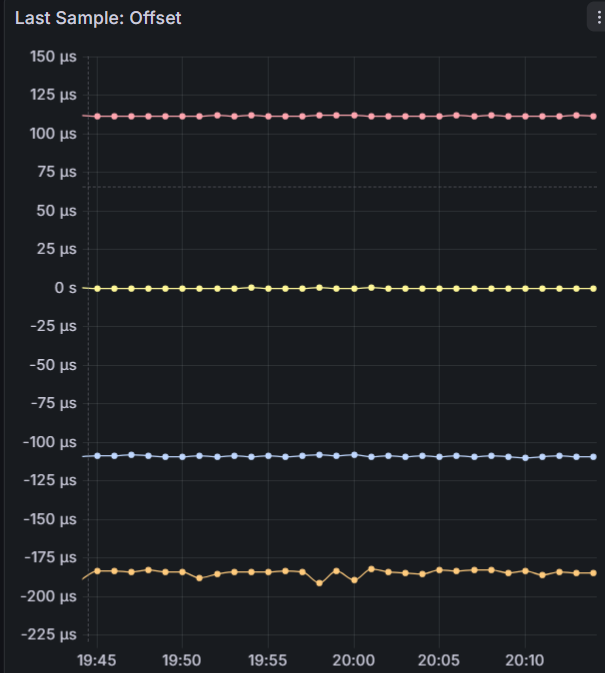
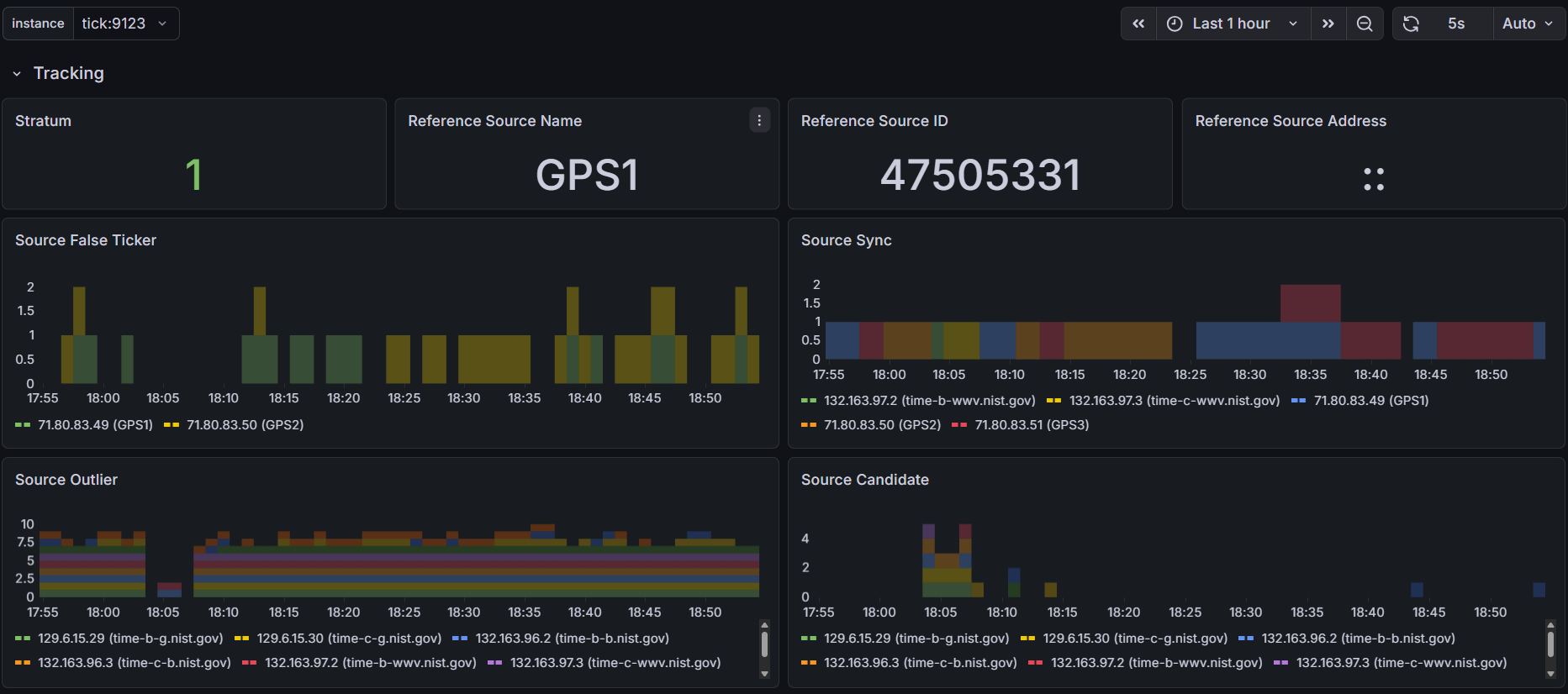
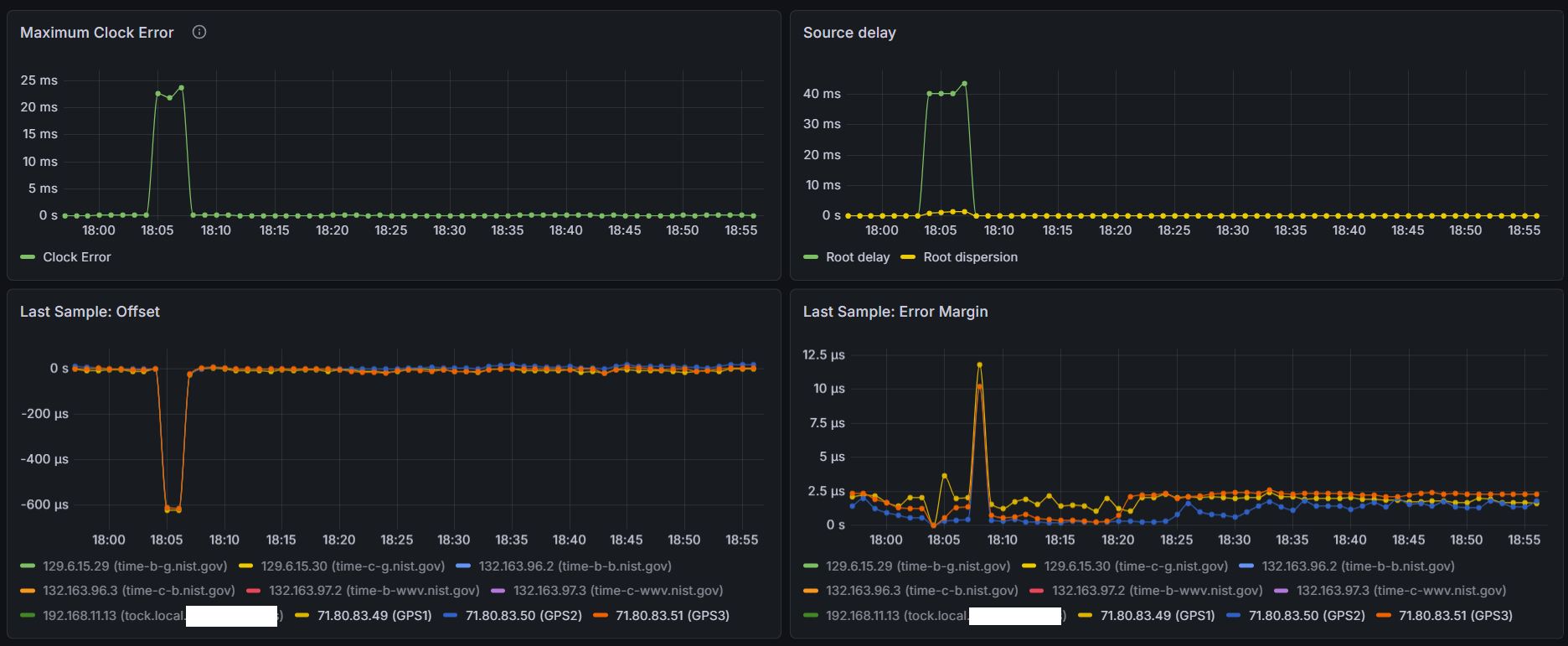
I did manage to setup Prometheus and a Grafana dashboard, one thing I’m finding interesting is the offset between the four identical ublox LEA-M8T’s I have on the 4 COM ports on this machine, COMs 2 and 3 are pretty close together and COMs1 and 4 seem to be outliers/false tickers - I’ve set them as “noselect” in my config, but their stats are still visible. Error margin between all four is about the same from what I can tell.
Right now each LEA-M8T has its own identical (puck) antenna, I do have a survey antenna but waiting on a splitter come in the mail - doubtful it will have a significant impact on this disparity though.
Wish I could understand why the difference in offsets between the COM ports, and if the solution is a fudge/offset factor in the chrony config - not sure that’s even possible with a SOCKS refclock
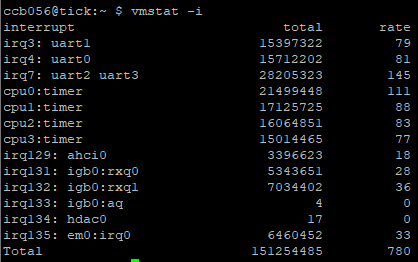
This means that when an IRQ is triggered it’s going to the port it triggered, in this case 2!! ports per IRQ, as most modern comports are buffered, it will start to empty the buffer, only after to goto the next port with the same IRQ. This will happen on every IRQ. Just depends when the IRQ’s happen and how much data the buffers and devices have.
In short, you should NEVER use RS-232 ports that share an IRQ, this was already known back in the BBS/Modem days as things would go wrong.
So either use only 2 ports with seperated IRQ’s or give EVERY comport their own free IRQ.
You should see different results. These are hardware IRQ’s that make the CPU look at EVERY port that shares the IRQ.
Try and find out, or use just 2 ports, Com1 and 2, do not use the others. And I mean hardware connected, not just software polling or use noselect. That will not solve it.
That’s a good point. Each receiver should have its own IRQ and CPU as reported in /proc/interrupts. If that is not possible, the receivers need to be configured with different pulse delays (e.g. 0, 1, 2, 3 milliseconds), so the interrupts don’t overlap.
The difference between Linux and FreeBSD might be in the order of handling pulses coming at the same time. A more stable order would make the reported stddev smaller, but cause larger offsets between the sources.
I’m trying to convince myself that IRQs may have something to do with this. While I think IRQ conflicts/sharing may have an effect on how wobbly the lines are, I’m not sure it would cause a constant offset between the channels.
.
.
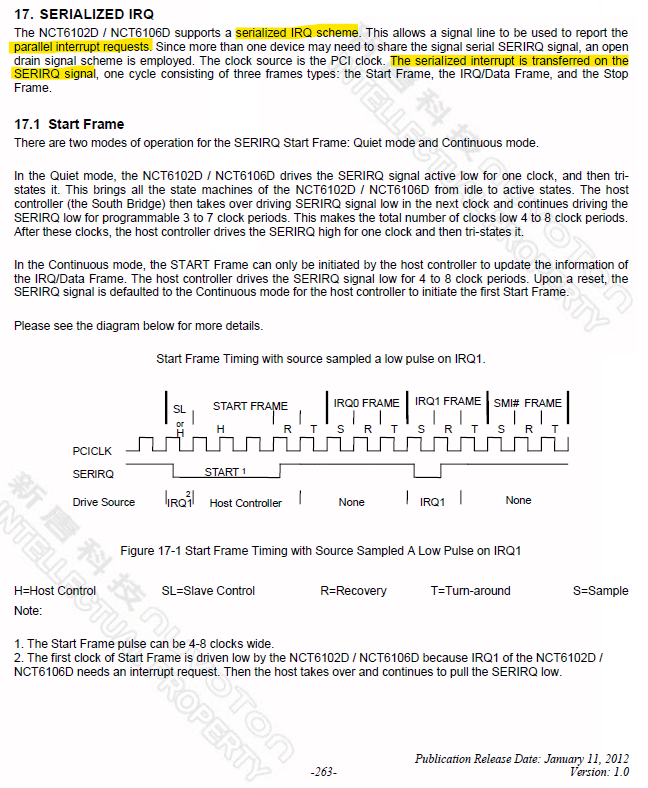
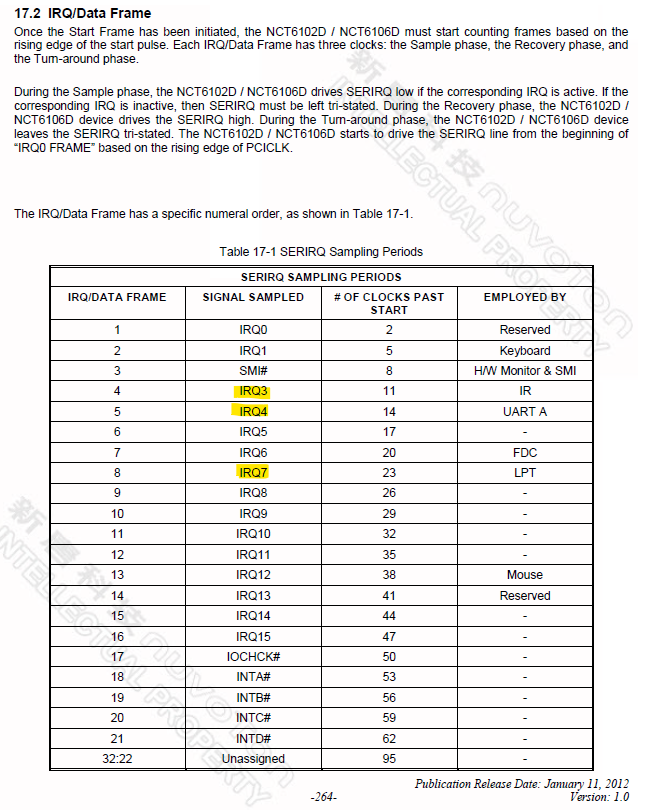
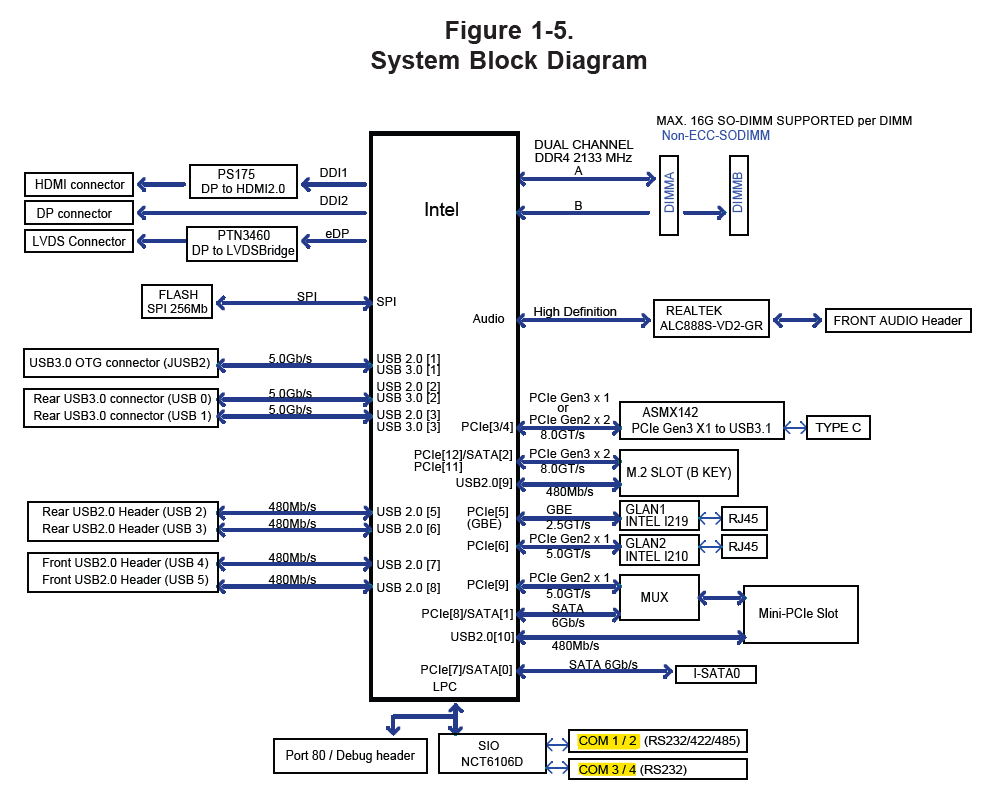
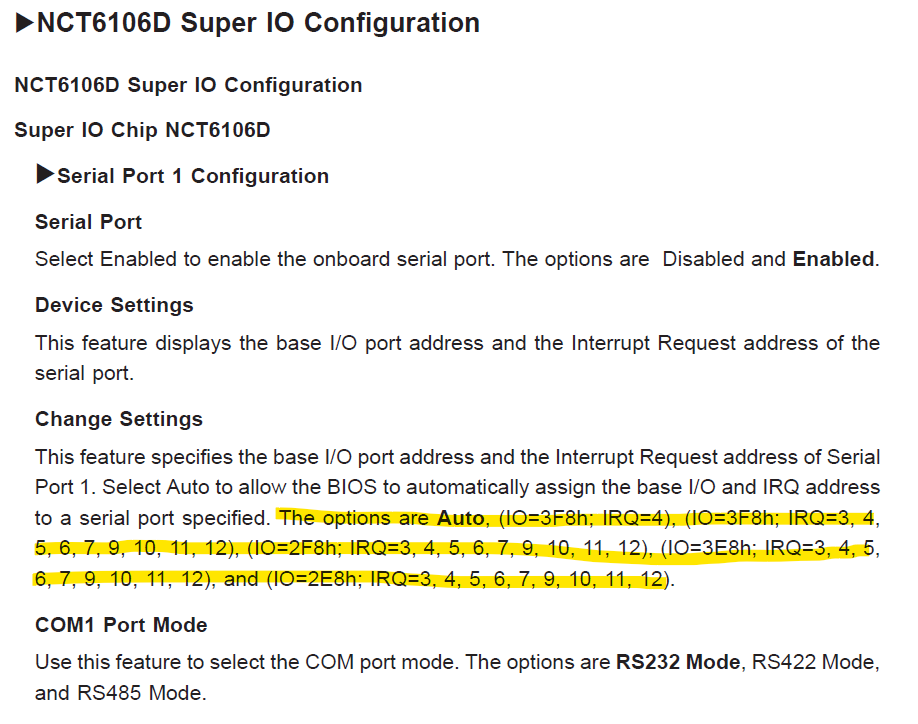
My Supermicro E101-60 uses the Nuvoton NCT6106D SuperIO chip - reading through the chip’s 455 page datasheet a few things stood out to me:
Wish Supermicro took advantage of the 6 port capability instead of only giving 4…
What effect does a 128-byte buffer have? Is this something that can/should be disabled for timekeeping? Is that why I’m seeing the constant offset between the GPS receivers?
.
.
This makes me think the chip is designed to handle simultaneous interrupts, and then serializes them on their way to the CPU. Is that why I’m seeing the constant offset between the GPS receivers?
.
.
I have all the IRQs on the four ports set to Auto - I did try manually changing them but for some reason that function doesn’t seem to be working as I would expect, I cannot actually select a different IRQ…
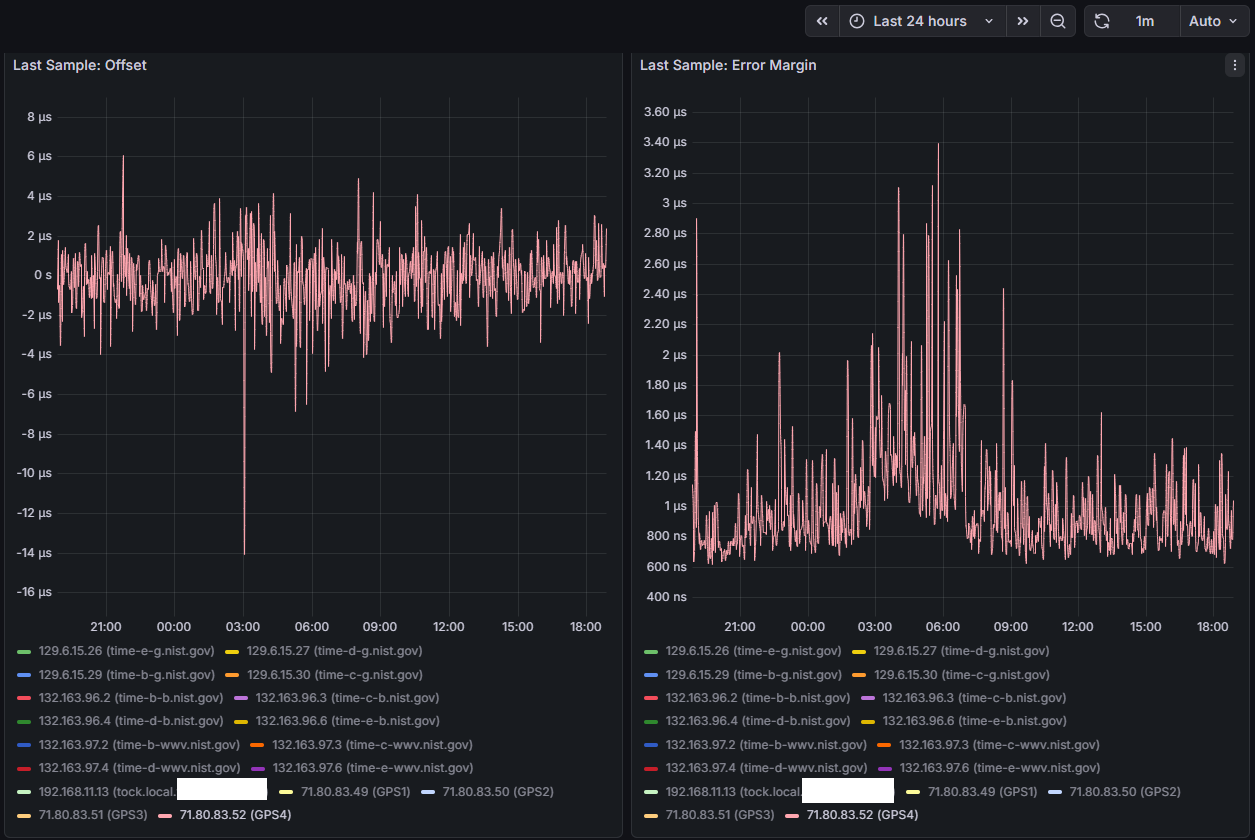
Will continue doing some testing, considering the above information I would assume the worst COM ports to be either COM 3 or COM 4 (uart2 or uart3) as they share IRQ 7 - here are some snips over the last 24 hours for COM 4 (others set to noselect in chrony, but still electrically connected and running through gpsd)
You could use IRQ 5 and 7 if you disable LPT-ports, normally they should become free.
However, why do you want 4 GPS’ses on 1 machine and none of them seem to have PPS.
I mean, accuracy doesn’t come with more GPS’ses but with a GPS that has PPS signaling.
You are the first that I see with RS-232 and 4x GPS, but no accuracy that comes near PPS.
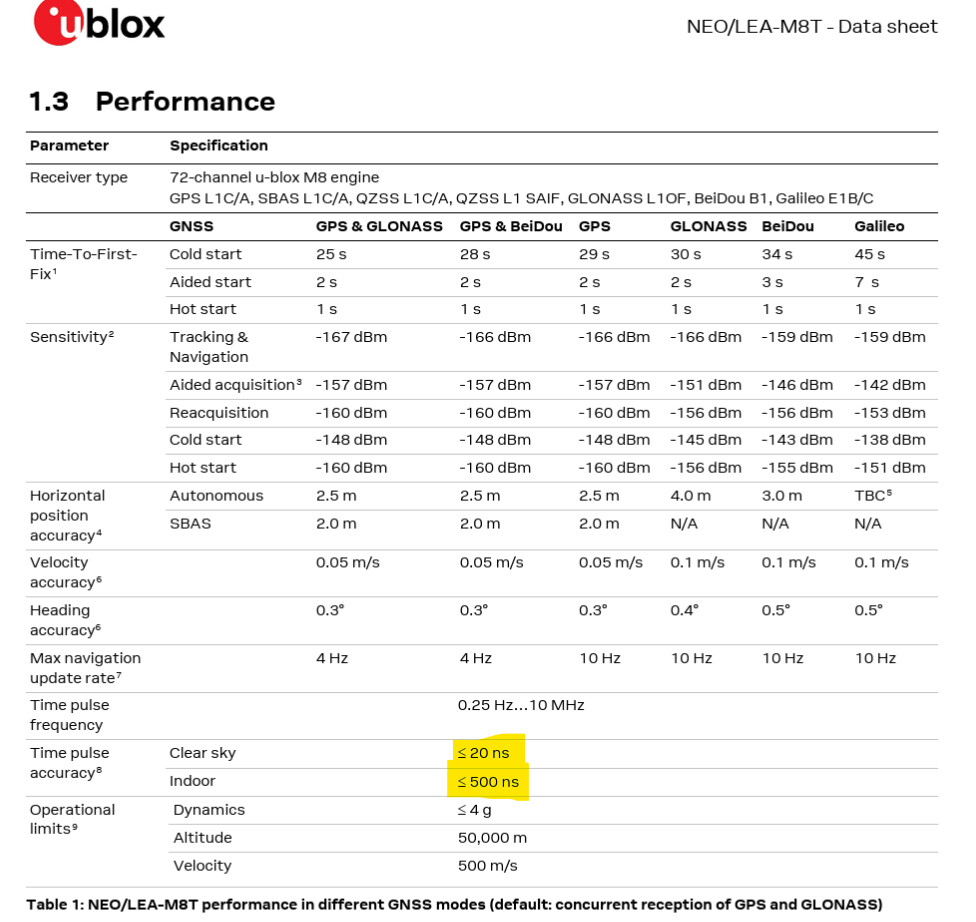
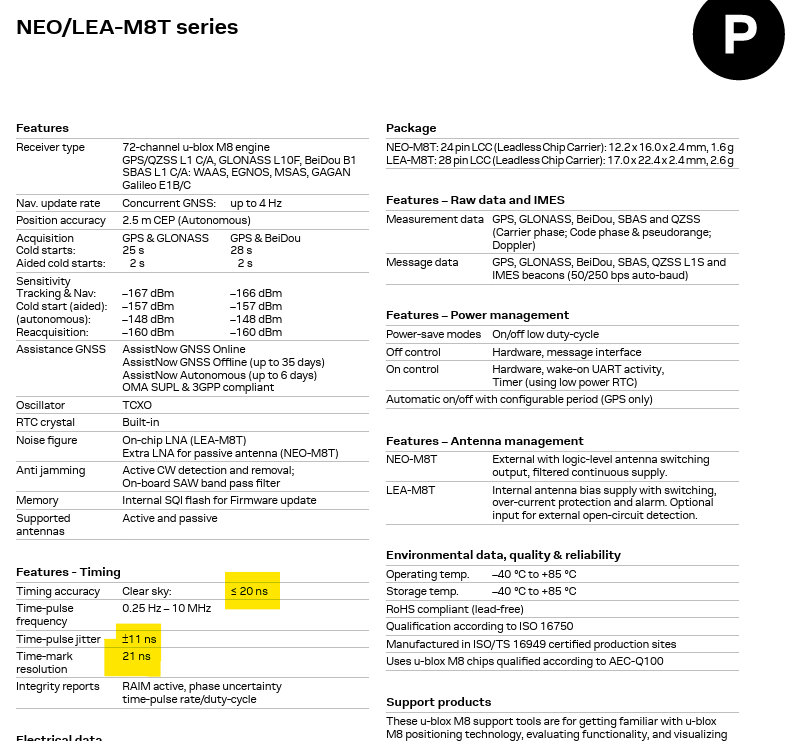
Sure sometimes they could get lucky, but PPS typical runs around <10ns on RS-232 when the sky is clear.
Do not get me wrong, but what are you doing or trying to accomplish?
BTW, I did ran myself with 2x Garmin+PPS on RS-232, it was no success, to many pulses, it just got worse.
As for FIFO buffering, it’s normal on UARTS for like 40 years or so, but it doesn’t help realtime data, a shared IRQ will make the chipset/cpu look at all ports.
Trust me, do not use such ports on the same IRQ, it didn’t work back then, it doesn’t work today.
I noticed your update interval was only 2 seconds, why is that? Mine defaults to 16. I would expect allan deviations to drive it higher, surprised its not.
What units typically run better than 10 ns?
My Garmin 18x LVC is only accurate to 1 us per it’s manual
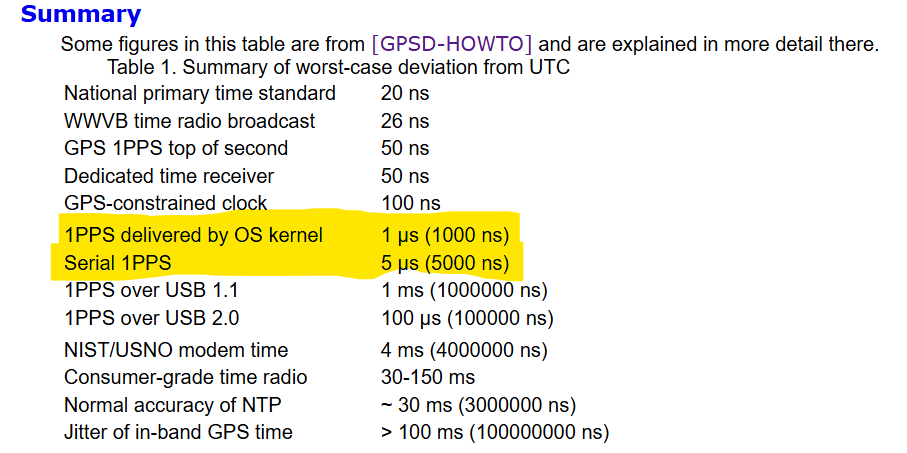
And those stats are on the output pin of the receiver, once they make their way to your CPU it gets to 1-5 us depending if you have standard vs kernel level PPS
I’m not impressed by the accuracy of the current NTP servers in my area of the Pool, so I figured I could contribute my resources and help improve things. Want to wrap my head around this system first before just jumping in and testing on a production machine.
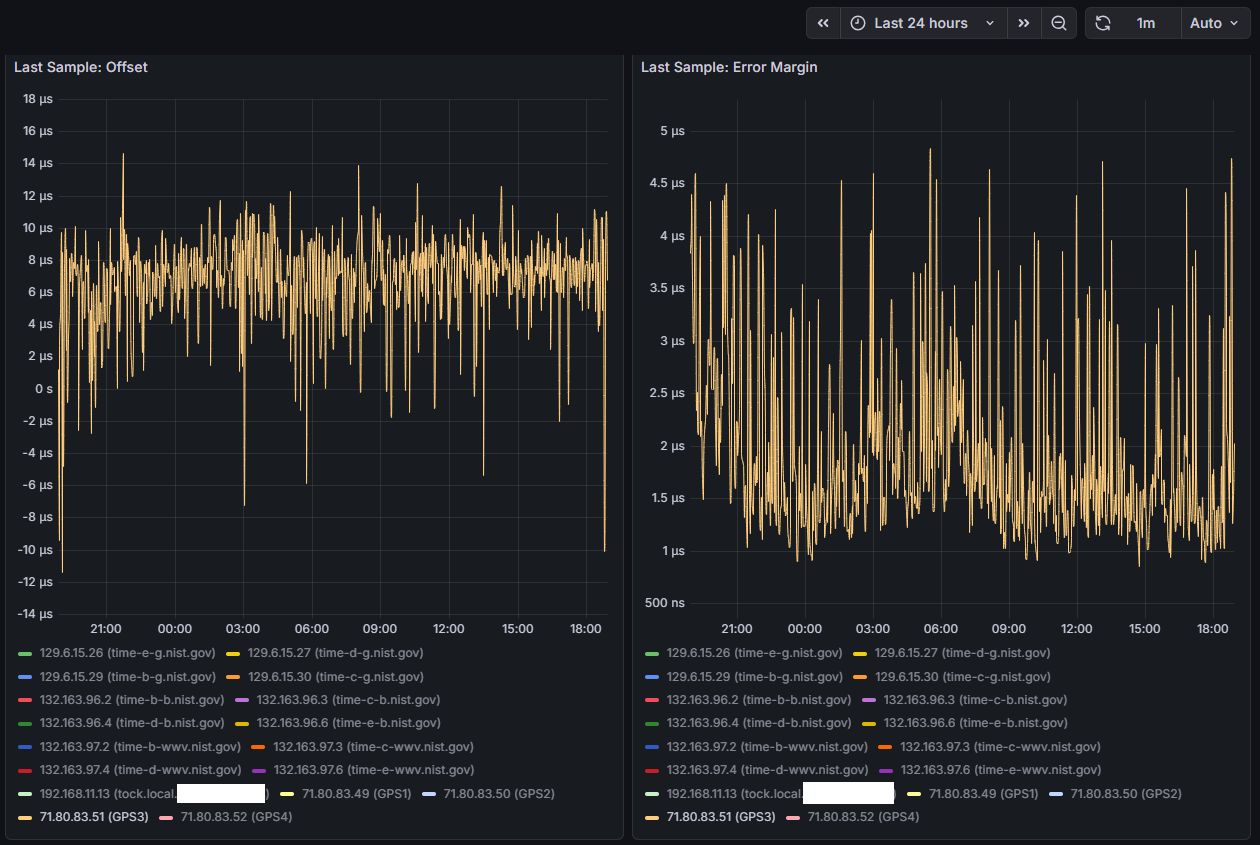
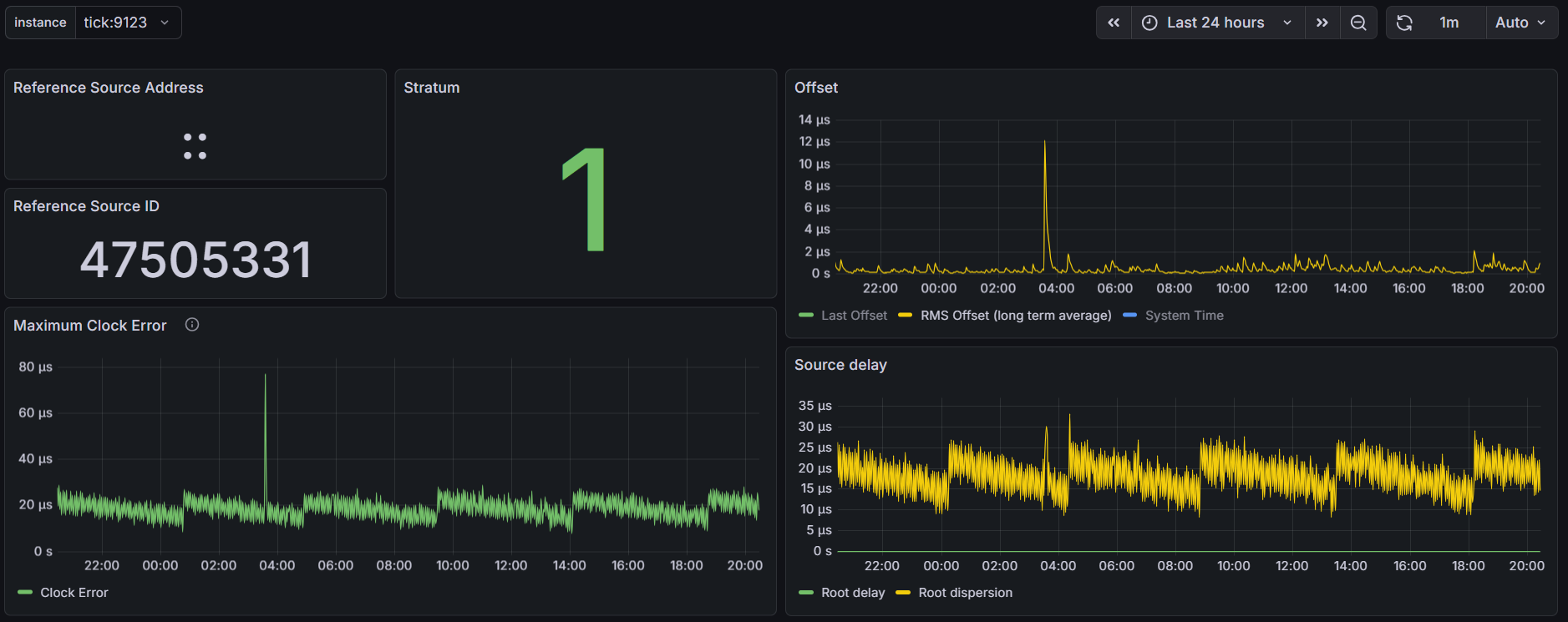
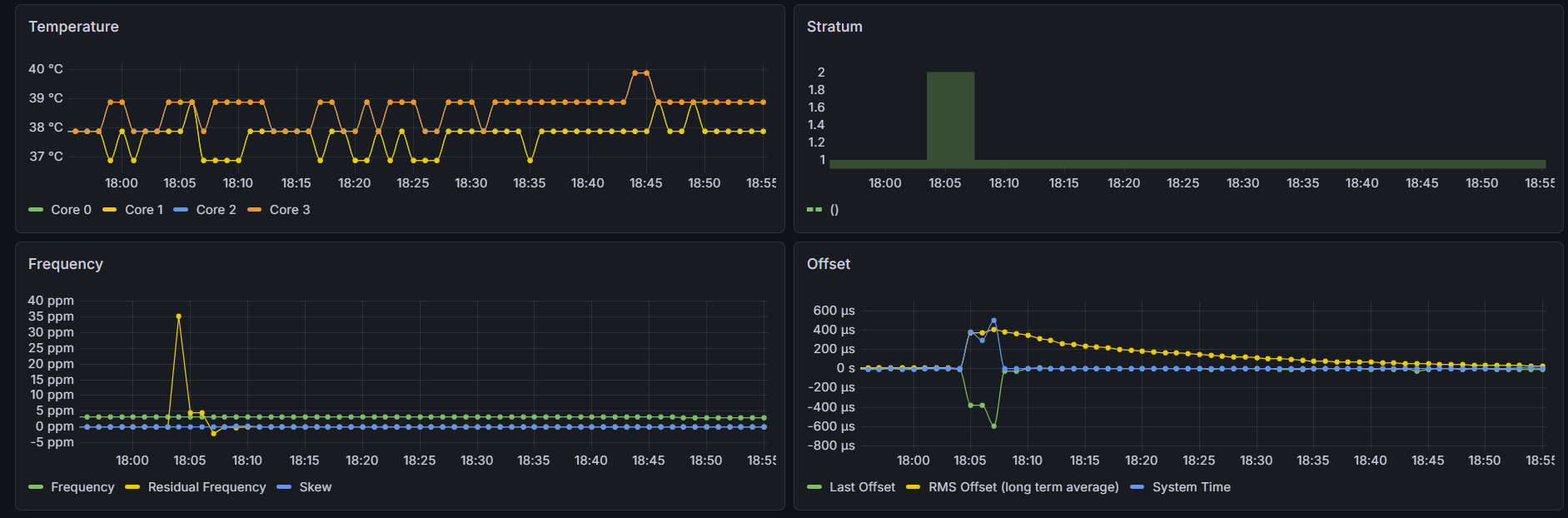
I do have updated graphs below of the last 24 hrs on COM 1 - remember the previous graphs were on COM 4 which was sharing IRQ with COM 3. COM 1 has its own IRQ and the graphs look nearly identical to me. Also, same sawtooth pattern for root dispersion which propagates to the Max Clock Error. If I could determine the crystal used on this system and pull the datasheet, I may be able to convince myself to change the default 1 ppm maxclockerror value chrony uses - that’s a huge chunk of the root dispersion calculation…
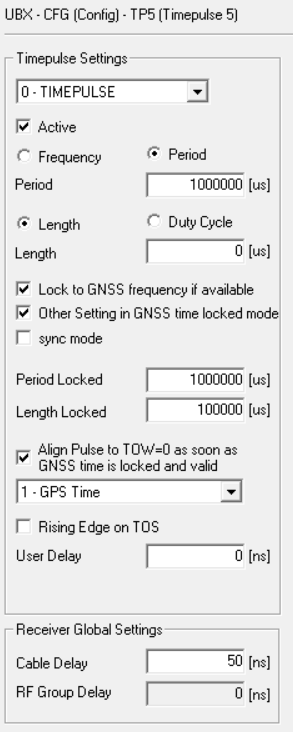
I’m going to give this a try, will space the pulses 110 ms apart, that way the last one finishes before the 1000 ms is half over, don’t want to confuse any of the logic in gpsd/chrony with alligning pulses to seconds…
Also, with 100ms wide pulses, that will give me 10 ms between pulses.
Hopefully this will all work right with the 33 mhz LPC bus.
The Garmin runs better then what Garmin writes, that doc is old. It runs typical below 5ns.
As for the ublox programming, gpsd overwrites it, unless you set gpsd to readonly, so it doesn’t mess with the gps.
I thought you where running without pps because you call them gps, most call it pps😁
What gpslines have you set in the config? As well as other settings.
I’d be curious to see the data supporting that claim
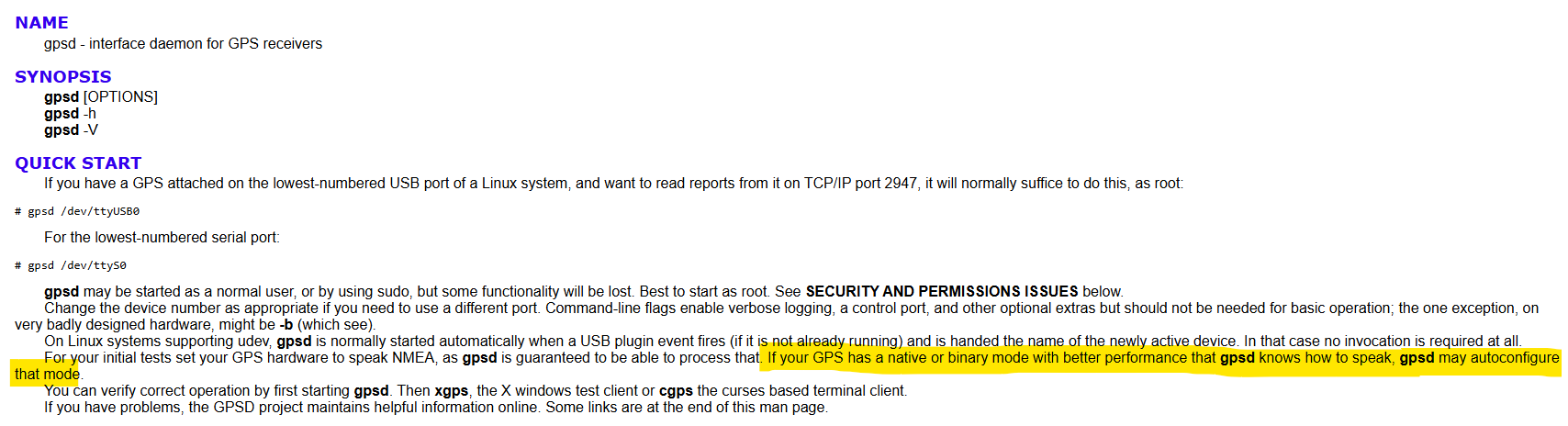
Yes and no. GPSD will sniff the incoming packets to determine the device, and then change from NMEA to Binary mode, but it wont change constellations, baud rates, PPS, or much else
Right now its the ublox and gpsd defaults. Once I get the current issues sorted out this will be one thing to experiment with…
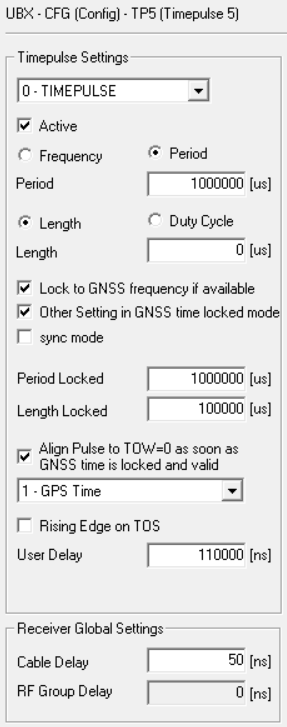
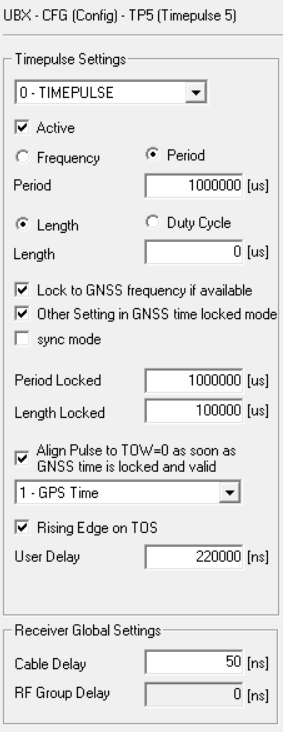
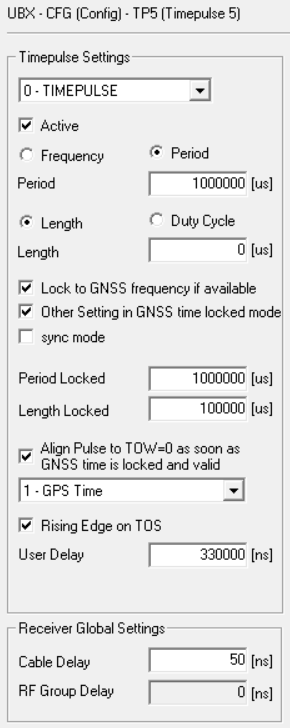
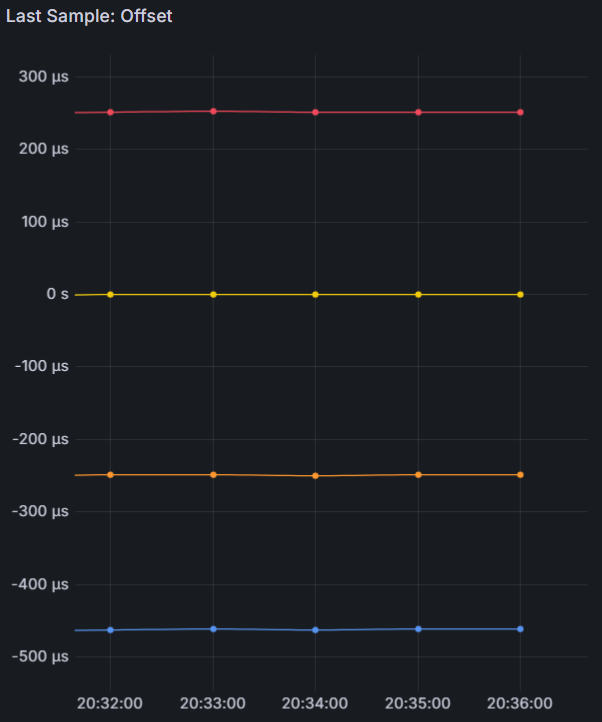
Which brings me to the data from the latest run, after changing the user delay in the ublox configs I think things are starting to look better. Looks like the LPC bus and serialization of all the incoming data was a contributing cause - once everything started to get evenly distributed in the sampling cycle things start to settle down.
This only has the last 20 hours of runtime but I think it’s representative:
I can see that COMs 1, 2, and 3 are all spaced 110 ms apart. COMs 1 and 2 have very clean baselines, where COMs 3 and 4 are still a little more wobbly. COM 4’s offset didn’t move as far out as I expected, only 70 ms away from COM 3 instead of 110 ms. I’m attributing the spikes to times where Chrony is combining the clocks to achieve better accuracy - something I’ll also need to look into and understand a little bit more. Next step will be to get the COMs on the shared IRQ further apart - I think their sentence transmissions are overlapping causing issues with the shared IRQ and qeueing up to the CPU. I’m thinking of keeping COM 3 at 220 ms and moving COM 4 from 330 ms to -110 ms. Will also add no-selects to COMs 2-4 to prevent the spikes until Chrony’s combine clocks feature is better understood…
Well that isn’t working either, the offset for COM 3 is at 180 vs 220, and noisy as hell.. (COM 4 is sitting at -110 as expected..) - going to play around with this a little more…
Notice a pattern? No matter what COM/IRQ the last pulse comes in on - it’s 40 ms away from where it should be. Something is going on in that superio chip… I just don’t know what…
Like I said before, run it with just 1 GPS on Com1, disconnect all the rest see what happens.
If the problem is gone, connect COM2, check again.
Until the problem comes back.
If it also happens with just 1 GPS, the source is something else.
Yes - I will do that - I guess I’m avoiding having to physically pull the devices out because the box isn’t in a convenient location - much easier to fire up ser2net and change the gps configs and other software settings through terminal
Also waiting on some equipment to come in so I can run the tests with all GPS receivers plugged into a single antenna in 0D/fixed/survey-in mode - what I remember from studying for my amateur radio license is perhaps the thing that matters most in RF is the quality of the antenna, and the little patch ones I’ve been using don’t even list some critical paramters such as phase center or axial ratio - there’s a lot of floating variables when each receiver is calculating time with a different constantly changing location solution…
And found a big error in my analysis from the other day - for some reason I was thinking in ms but everything was actually running in us… with the number of UBX binary messages gpsd defaults to, at 115200 baud it was taking about 60 ms to transmit on each receiver.
gpsd effectively hides the differences among the GPS types it supports. It also knows about and uses commands that tune these GPSes for lower latency. By using gpsd as an intermediary, applications avoid contention for serial devices.
When I was first dabbling with setting up my own Raspi NTP server, I kept having issues with my U-Blox GPS, namely that certain messages I enabled, and others I disabled while using it on my main Windows PC, would get “reset” to a seemingly default state everytime I used it with the Raspi NTP server when using gpsd. It drove my up the wall at the time because everytime this happened, I had to take down the NTP server, disconnect the GPS module, reconnect it to my TTL to USB adapter, and redo the messages on my PC (at the time I did not know of programs such as ser2net). After searching for the issue online I finally came across a post mentioning how gpsd will reconfigure known GPS modules, like a U-blox, with some default message state, which is exactly what was happening. Disable the ability for gpsd to “write” to the GPS device, and the messages I’ve enabled and disabled, stay exactly how I set it.
Those .c files you linked seem to have been updated in the past month, so I do not know if there have been any changes since the latest gpsd build installed via apt, which is 3.22 on my end. Either way, for U-blox chips I will always disable gpsd from writing to the module.
Antenna splitter (Advanced RF 6SGPS1) has been delivered, removed the generic puck antennas and replaced with a single survey antenna (Beitian BT-100), updated all GPS receivers with a surveyed-in position, TDOP dropped to 0.20, updated Grafana dashboard with a few more charts, resumed testing (using 3 independent COM ports, IRQs, and pulses spaced 100 ms apart) - it appears Chrony is jumping between refclocks, which is hurting RMS metrics.
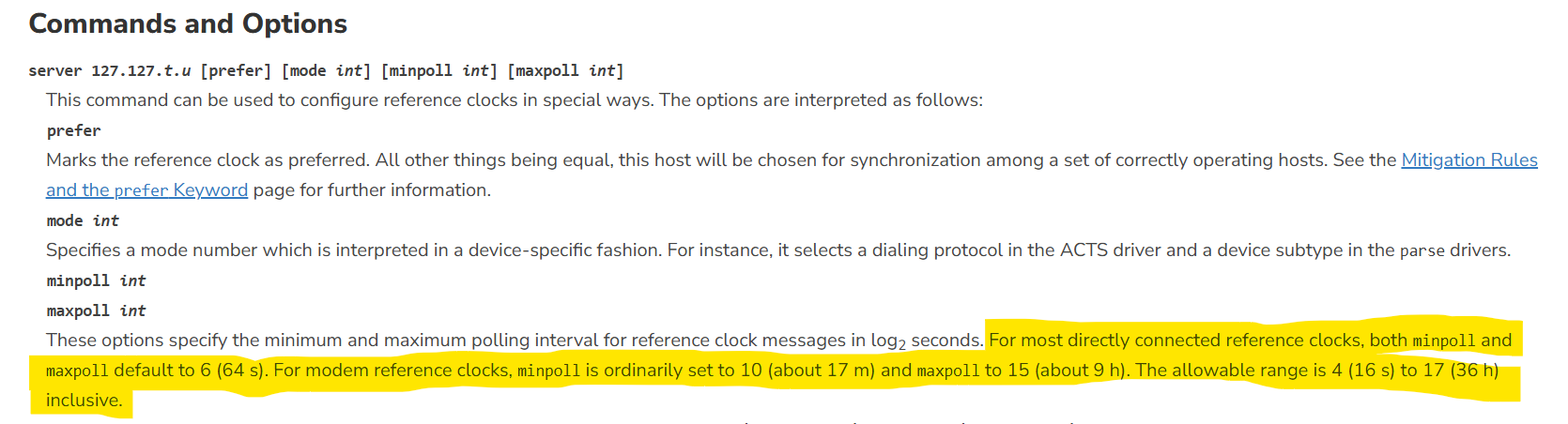
While chrony supports dynamic polling for server/pool - starting at 64s (2^6) increasing to 17 minutes (2^10) under stable conditions - chrony does not dynamically poll reference clocks. NTPd does.
Back when I was using ntpd, I took advantage of reference clock dynamic polling.
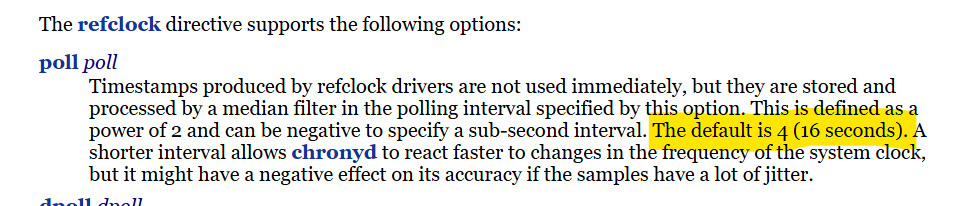
I think chrony’s default polling interval for reference clocks, 16s (2^4) is too low, and not at the allan intercept for the system. I believe the receivers PPS output is much more stable than the path from the COM port to the CPU.
For comparison, ntpd defaults to a longer polling interval for its reference clocks, 64s (2^6).
I’ve increased the polling interval in chrony to match ntpd - we’ll see how it goes…
I don’t think you need it with Chrony SHM reading.
I found during testing that other ways of getting time from GPSD made them jump all over the place. Also as setting polling too fast.
E.g. my 5Hz Garmin was far more unstable then the 1Hz when polling like the docs told me to do.
With SHM polling default (4) they are stable. Looks to me it sees the ‘SHM-bullitinboard’ takes all data and starts calculating over this.
I do not know how other types work, but SHM is a bulletinboard and you take data from it, no matter how old it is. Sockets may work different and you may need constant polling. With SHM it stays there for some time until the BB is cleared.
This is how I understand it. You may want to try it. BTW, I use maxlockage as it uses more samples.