Modem/Routers slowdown on heavy traffic

Your netspeed is set to 25 mbps - but what is your average upload rate over the last 24 hours?

For example - my netspeed is set to 3 gbps - I only have 1 gbps full duplex fiber - but ntp only accounts for 6 mbps of traffic

Some good information about the netspeed setting here:

This was the setting, I went up every time, the last peaks where 25mbit, before I lowered it again.

Let see what 1Gbit does, as Belgium has too little servers, it’s probably putting too much pressure.

But I want to test it. This isn’t a VPS, but an homeserver.

Let’s give it a try :grinning_face:

See what happens on the router…

It goes waaaaaay up at 1GBit, 15K connections (read = memory), but the local lan seems so far unaffected.

I’m not keeping this 1Gbit setting, but it’s fun to see that IPfire has no problems with it (so far).

What the h*ll is going on? This is the 1Gbit speed setting…

I have NO issues (yet), fingers crossed.

I never ever got this far, no Draytek, no Fritzbox, no MicroTik, not anything.

I did a tiny bit of IPfire tweaking, but my local network is not affected after 30 minutes.

What is going on here?

Only tweaks I did are:

# UDP timeout tacking, 15 seconds instead of 30
net.netfilter.nf_conntrack_udp_timeout = 15

# Increase kernel backlog queue:
net.core.netdev_max_backlog=4000
# Packets queued per CPU between NIC and socket layer

I did nothing else.

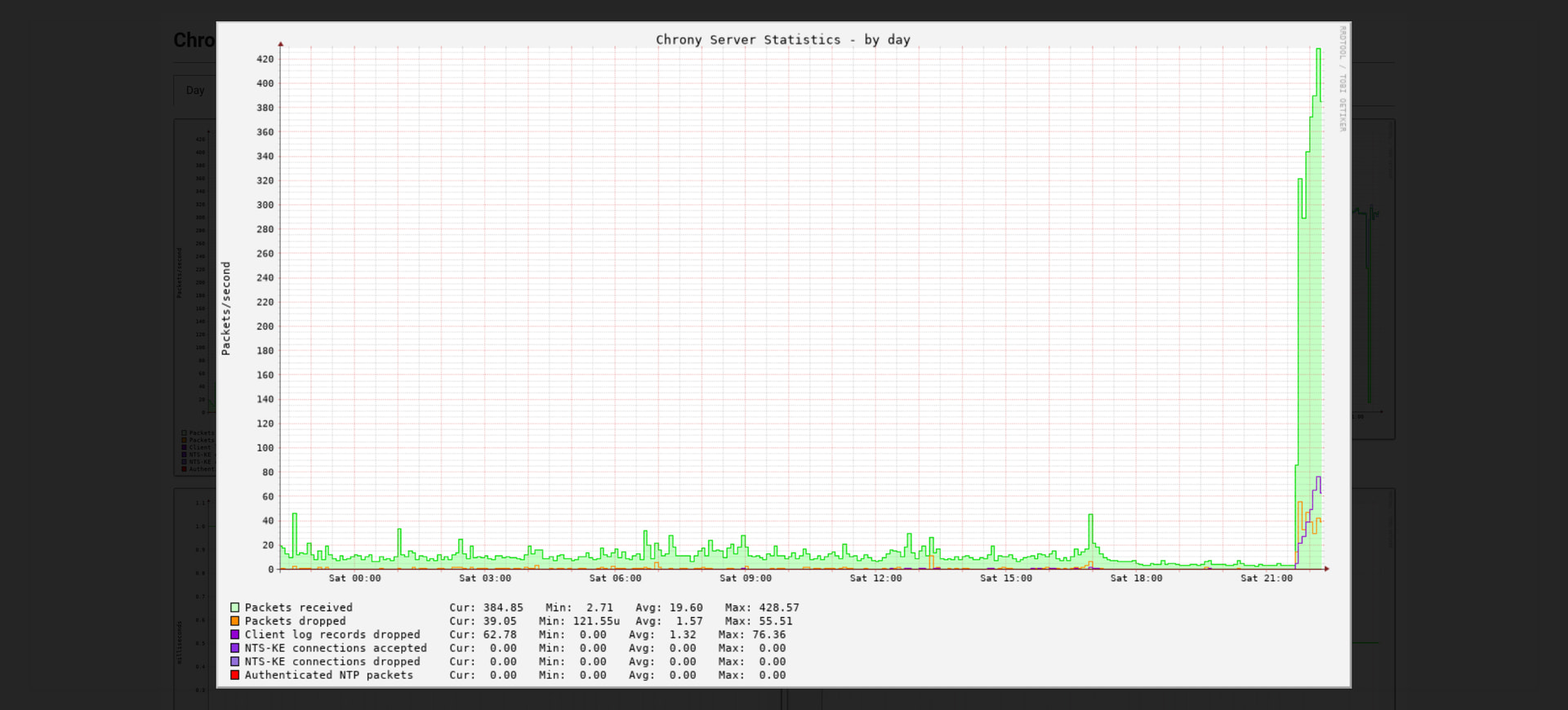
that “spike” looks like only 400 packets per second - thats not very much at all - less than 1 mbps I think

Still doing it…

Router…

It’s still at 1Gbit…speed.

Sure there was a spike, but the load is way above anything that it would deal with before.

I have no issues…I never was able to do this. Never, not even close.

Wanna try max 3?

yes - I think you can handle 3 gbps

do you have a graph that shows bandwidth? currently youre only showing packets per second and open states

This is the best I have:

I have 100mbit down and 35mbit up.

It should never be able to handle 3Gbit, unless the speed-setting is terribly wrong.

But I wonder. Why did my system slowdown? All the time even al 6mbit.

Now nothing. I set it to max speed.

Edit: 3Gbit set.

I’ve observed the netspeed setting to be terribly wrong.

I’ve observed the netspeed setting to be terribly wrong.

You are probably right, but it doesn’t explain why a very low setting kills my local network.

As it did. and now it’s doing near 500 packets/sec.

I makes no sense, unless most routers are all junk.

I tried so much, but IPfire seems to handle it like there is no load at all.

Most consumer routers are junk

10,000 packets per second for 2 days (NTP server)

Only uses around 6 mbps (netspeed set to 3 gbps)

Not only those.

Current load at 3GBit…

But see number of connections…and I do believe connections is the issue.

As it keeps tracking them, and most routers can’t. Even the most expensive ones.

Yeah, same as mine, but still going up in numbers.
But it uses a lot of connections, that are tracked for x-seconds.
I think that is the problem.

Network performance studies should include controlled artificial loads. Experiments can separately vary the NTP request rate and the number of clients. If a router is susceptible to memory or CPU exhaustion, the breaking point can be roughly determined. See GitHub - mlichvar/ntpperf: Tool for measuring performance of NTP servers and PTP masters · GitHub for one such tool.

There is no substitute for testing with real NTP traffic, of course. Bas’s traffic is very bursty. One step in determining “why” could be using chrony’s built in tools

In chrony.conf:
clientloglimit 100000000

I like to dump out the client counters every ten minutes:
while true
do
date
chronyc -n clients -r
sleep 600
done

Hi Steve,

Well the 3Gbit setting was a tad too much asking from my VDSL connection.

The router didn’t overload, but the upload did?, I had to reduce it to normal levels.

Client-list at the moment with loglimit 100000000 :

root@server:~# chronyc -a -n -m clients | wc -l
524284

I can not run this for hours as other services start to fail (during these high levels), not overloaded but just too much traffic (useless traffic?).

Don’t forget, my line is just 100/35mbit :grinning_face:

But I have another idea, as the router isn’t overloaded, nor is my network at home.

As you can see in the graph, when going from e.g. 6mbit to 1gbit and then 3gbit is a massive increase in traffic.

IPfire holds up just fine.

As you can see the traffic isn’t that high.

So I’m thinking MTU got something to do with it, maybe packets dropped of fragmented too much.

If the 3 gpbs setting only resulted in 600 packets per second - it’s not too much bandwidth for your 100/35 mbps VDSL connection

The NTP packet isn’t larger than 100 bytes - I haven’t had DSL is over 25 years, but I think the frame size back then was 1492 bytes - MTU isn’t an issue

Sounds like IPfire is being overloaded with states and not clearing them fast enough

Well I have Steve his suggestion running, and it’s answering this many clients:

zo 28 jun 2026 17:17:49 CEST
36
zo 28 jun 2026 17:27:49 CEST
11789
zo 28 jun 2026 17:37:50 CEST
19906
zo 28 jun 2026 17:47:50 CEST
35400
zo 28 jun 2026 17:57:50 CEST
42652
zo 28 jun 2026 18:07:51 CEST
47501
zo 28 jun 2026 18:17:52 CEST
56647
zo 28 jun 2026 18:23:00 CEST
61736
zo 28 jun 2026 18:33:01 CEST
69047
zo 28 jun 2026 18:43:02 CEST
78398
zo 28 jun 2026 18:53:03 CEST
84656

The code I use, adapted a bit.

while true
do
date >> output.txt
#chronyc -n clients -r
chronyc -a -n -m clients | wc -l >> output.txt
sleep 600
done

This is running at 100mbit setting.

Also beware, the router is set to drop hostile networks, so not al traffic reaches Chrony.

See here: Don't Route Or Peer Lists (DROP) | Use with firewalls & BGP

I know, but I have lowered it to 1452, just to be sure.
Did some testing with ping and got loads of timeout on packets size 1492 and 1500.
Lowering the MTU/MRU won’t harm, just to make sure it’s small enough.

I also did lower UDP tracking from 30sec to 15sec, so it should not track too long.
This worked in the MicroTik as well as in the DrayTek.

But I was never able to set it near 100mbit or more.

This is your problem:

see here:

and here:

At 3 gpbs and 0s udp timeout (stateless udp) on pfsense (state type = none), my router sees ~700,000 connections at any particular time

ipfire cant assign stateless udp like pfsense can, so the best you can do is keep lowering the udp timeout (but I dont think ipfire can make it rule dependent, its a global setting)

@ccb056,

You may be right.

net.netfilter.nf_conntrack_max = 1048576 was 262144…

If that is the solution, I buy you a beer!!!

I hope so.

I raised it, let’s see what it does.

I suspected the connection-tracking for a long time, is it really this simple?

My current adjustments:

net.netfilter.nf_conntrack_udp_timeout = 15 (Need 15 for Voip)
net.core.netdev_max_backlog = 4000
net.netfilter.nf_conntrack_max = 1048576

And I set MTU/MRU to 1452, just in case…you really get a beer if you solved my problem!!!

New testing, but at 3GBit…!!! fingers crossed…