If I were you - I’d try setting up pfsense on a spare machine just to try it out - I’ve never had an issue setting it up on bare metal, virtual machine may be different…
On a Linux box with nft, it could be just three rules, e.g.:
table inet stateless-dnat-for-ntp {
	chain prerouting {
		type filter hook prerouting priority raw - 1; policy accept;
		iifname "e*" udp dport 123 ip daddr 10.0.0.200 ip daddr set 192.168.142.4 notrack counter packets 144881852 bytes 11012468732
		iifname "a*" udp sport 123 ip saddr 192.168.142.4 notrack counter packets 144614292 bytes 10990686960
	}

	chain postrouting {
		type filter hook postrouting priority raw - 1; policy accept;
		oifname "e*" udp sport 123 ip saddr 192.168.142.4 ip saddr set 10.0.0.200 notrack counter packets 144614292 bytes 10990686960
	}
}
On modern Linux systems, iptables is just a frontend for nftables anyway. The “- 1” in “priority raw - 1” means that these rules get executed before any nftables rules installed by iptables, so the two don’t get in each other’s way.
And the US zone is even worse off in that respect than the BE zone currently, where a server serving both the BE and NL zones at 3Gbit for both IPv6 and IPv4 will get you less than 3 Mbps per direction (though I found that even within a zone, servers with the same netspeed setting can still get noticeably different actual traffic rates).
It’s fairly obvious to anyone who understands how NAT actually works that it’s best to do stateless (or even better, no) NAT on UDP services like NTP and DNS. It’s just that it’s pointless to keep saying so when the other party is going to just keep ignoring that fact.
For those who have never thought about NAT and are used to their Internet “just working” before they tried to do something like providing an NTP server to the public Internet, I agree it would be worth pointing this out as number 1 in the list of things to do for a good outcome. Along with the unfortunate fact that a typical consumer broadband router may not expose this sort of configuration, leading to a bit of a journey of discovery.
Like I said before, it’s BSD, I have no experiance with BSD.
So it’s not an option.
Anyway, I found that the DrayTek has 2 tables for NAT.
One that has 60K states and another that is used when SPI is enabled, that one seems limited to 1024 states.
I now disabled the SPI, don’t need it anyway, and NAT-rule-filter-page now shows 60K sessions.
I found others complaining about DNS problems, then they suggested SPI is the issue.
So far so good…as traffic in Mbits was never a problem.
Edit2: I opened a new ticket at DrayTek to fix this problem, as it should not happen when you want performance over ‘security’, as I do not care about security, my servers are secure themselves
Funny you say this, with 100mbit load the CPU went up to 40-50%.
It has never done that before as I was never able to sustain so many sessions.
The ram is about the same.
Before I could not even get those numbers, as the tables crapped out.
I did lower my speed, as it was just a test, this server shouldn’t handle big loads, but it should not make the router go nuts and stop serving/natting, as it did before.
Stupid is, in their manuals they never tell you the impact of leaving SPI enabled, same as filter-rules. I disabled them all and 5000+ sessions was no problem at all. (According to DrayTek modem info)
See, this happened…and no DNS errors or other problems.
Yes I looked at IPfire. But I stick to the DrayTek, it’s working fine now.
I forwarded my configuration to DrayTek and hope to get it performant by default, they are going to look/test it.
As I told them the default settings are a problem and kill performance, it’s really bad.
But it works now, no issues.
It seems even some public cloud can not do NAT right on session tracking…
I have a S2 server in cn zone and with shared 200Mbps bandwidth, and there’s no problem handling iperf UDP traffic at 2Mpps, however when it comes to pool clients, there’s a significant packet loss between public network inbound and private NIC inbound when NTP packets reached ~8kpps (yes they provided both public and private pps charts on the panel so I noticed the differences).
The cloud provider uses 1:1 NAT for instance VPC networks, so I’m assuming they have (mistakenly) enabled some sort of session tracking even though they don’t have to. Conntrack for NTP ports are already disabled on the virtual machine so this won’t be a problem. Chronyd’s CPU load is at ~10% so definitely not bottleneck.
The server’s score dropped rapidly when the bandwidth set above 3Mbps, and IPv4 ntpdate query will encounter heavy packet loss, so I had to keep IPv4 bandwidth at minimum to stay in the pool. (now set to 1.5Mbps, with avg. 3kqps NTP requests).
Had opened a ticket to cloud provider, their engineers are still working on this and never solved this problem…
Considering switching to another cloud provider for v4 traffic.
– EDIT –
Just got response from customer support that the NTP packets somehow triggered the cloud provider’s DDoS protection system and it automatically filtered a part of incoming UDP packets… Negotiating whether they can raising the detection threshold but I wonder they might not willing to do so for a cheap shared VPS like that.. Sigh.
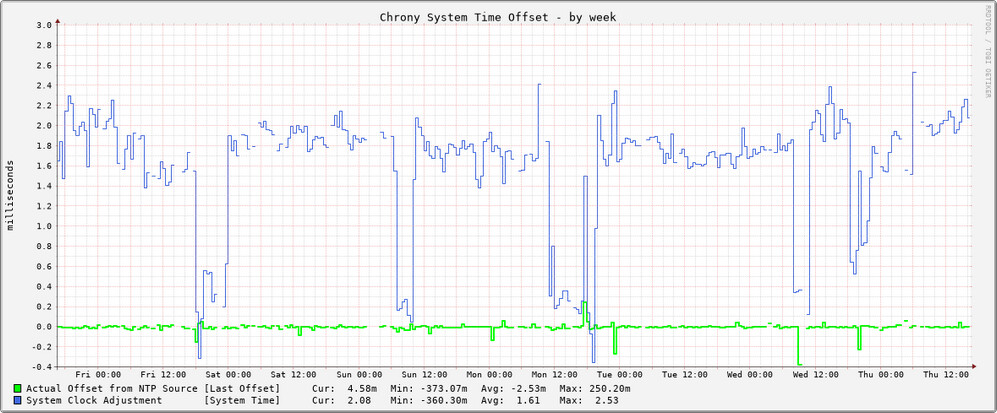
The gaps in the top graph look more like local problems to me, ie. chronyc is unable to query the chrony daemon for some reason. These local queries do not go through your network interface, so ISP’s network configuration should not matter in this case. /var/log/chrony-network-stats.log may have some hints regarding this.
What laymen typically call a modem is actually a modem, a gateway, a router, a bridge, an access point, a DHCP server, a DNS server… you get the drift.