hi all, I just connected my NTP server yesterday, rasp pi with GPS module but it never seems to get above a score of 10. Whats interesting is it has this sawtooth pattern on the graph. Just wondering if this is normal and if not has anybody seen similar and its reasons.
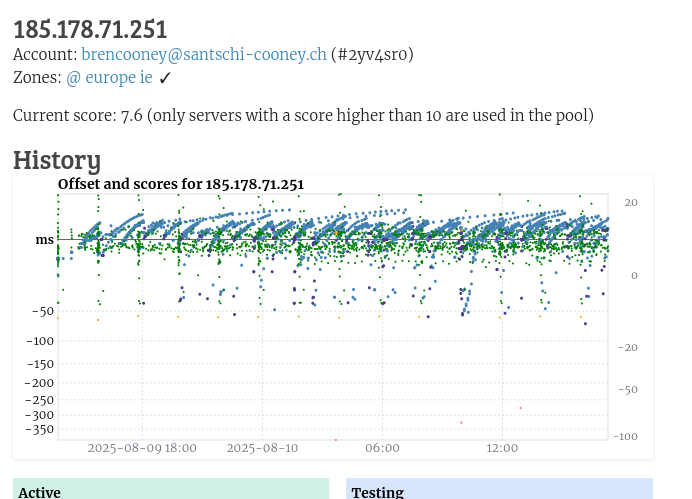
No it’s not normal. Your connection is timing out for some reasons. Click on your IP, scroll to the bottom and check the log by clicking “CSV log”
Do note that your server will get flooded by requests when you join the pool. Make sure you’re prepared for it.
This kind of sawtooth pattern is often indicative of your server, or more likely something associated with it (e.g., router is a typical candidate) not being able to handle the load.
Set your server into monitoring only to see the baseline, i.e., it should stabilize, and eventually move well above 10.
Once it does, start with the lowest netspeed and slowly work your way up until the pattern, or other issues (re-)occur. Wait a good while after increasing the netspeed for things to settle and to make sure things are still stable.
If things get unstable after a netspeed increase, go back down again with the netspeed until you found the highest value where it still remains stable (or stay at some other, lower value obviously, no requirement to operate at the edge of what the overall system supports performance-wise).
If it does not even stabilize in monitoring only, then something else is amiss that would be worth looking into.
Thanks all, I was wondering if the router would be okay but I’ve a feeling it’s bogging out. Time to swap it out. B.
1 Like
Obviously up to you, but have you tried running in monitoring-only, or at at least noticeably lower netspeed?
The forum is full of reports where especially consumer devices cannot handle the specific type of load that NTP traffic can create at higher netspeed settings in some zones. So unless you want to go beyond what your current model supports, maybe no need to swap out the router, yet - at least maybe not without knowing what its specific limits are.
Anyhow, good luck!
The thing is, most routers can handle raw bitrates of, like, 100 Mbit/s fairly easily. The problem is that by default many routers try to keep track of all the connections. Disabling the firewall options or otherwise making sure there is no connection tracking would help. If the router acts as a simple bridge and does not try to do anything special it’ll probably work just fine. If the router does NAT and/or port forwarding to a device on the LAN you may run into problems. A different router might not help.
As noted by many above, the Customer Premises Equipment, specifically the router, will begin to fall over if the number of request packets per second exceeds its ability to track the states of a NATed NTP server’s connections.
I have a R Pi CM5 running the box-stock NTPSEC, behind a Spectrum-provided router and a 600 MB download bandwidth from the cable. If I set the Connection Speed above 25 Mb, the dropped-packet alarm begins to sound every few seconds when there is a surge in demand, and, in addition to bad pool monitor scores, other unrelated activities on the local net may randomly fail. My graphs would look exactly like yours.
I note that you have put your server into monitoring-only, and apparently tried some lower netspeeds as well - the latter with little success, it seems unfortunately. But the stability while in monitoring-only mode confirms that it is something related to the load that comes the way of your system when in the pool.
I don’t know what the conditions are in Ireland. Just if you can, would be interesting what bitrate/packet rate you observed at what netspeed, especially at the lowest one (512kbit), to get an impression of the baseline. But only if it is no trouble, and, e.g., some device readily makes such information available (e.g., the router, or the server itself (e.g., bwm-ng on Linuxoid systems)).
Anyway, either the IE zone might be bordering on what some call an underserved zone (which would be interesting in that part of the world), or something in your setup is just very susceptible to load, either performance-wise, or being outright faulty.
One thing that could be tried is to lower the netspeed even further - which the pool unfortunatey makes somewhat difficult, and also recently increased the limit as to how low this could go (used to be 1kbit, last time I checked with the new system, it was 256kbit).
Or really swap the router, or other device, that you’ve identified as the likely or actual bottleneck (unlikely it’s your uplink bandwith, but even that is possible, depending on circumstances).
If you are interested in trying lower netspeeds, and willing to experiment a bit even when a positive outcome is not guaranteed, let me know. (Even a 256kbit setting may still be too much - it’s just half of the official lowest value, and the lower the netspeed, the less accurate the pool’s load sharing mechanism. I.e., the relative load will be less proportional to the netspeed than at higher netspeeds (the relationship isn’t linear anymore): halving the netspeed value results in higher than half the load at the higher netspeed. But the point is to bring down the absolute load, which may still work sufficiently well.)
Hi,
Yes, the setup I have does seem to be bogging down at the lower speed, iv a feeling it’s the router as was mentioned by some of the others in a post I made. Some mentioned that NAT can result in this. The router I have is a fritzbox4040 which is connected to a 1gb fibre. I’m on holidays at the moment and when get back I’ll swap it out. Would you rather I take it out of monitoring as well?
Regards
Brendan.
No, no issue there, that doesn’t hurt. And it speeds up things when you start working with the system again.
NAT is a factor, but with consumer devices, it could also just be the CPU having to shuffle packets forth and back between interfaces (rather than this being done in specialized hardware).
Whatever it is, the interesting part is not that this can happen, sadly very common occurrence in large parts of the world. But that it seems to happen at such low netspeed settings in what typically is not a part of the world where this is expected. In my home zone, central Europe, a 512kbit setting results in no traffic that my FB would even notice, that starts at a low double-digit Mbit setting only.
So apparently a 512kbit setting (assuming that is the lowest you actually tried) making the FB keel over means that the IE zone might have a client/server ratio that results in a much higher traffic rate even at 512kbit.
In the meantime, enjoy your vacation!
I very much doubt that is the root cause of anyone’s problem who is hosting a NTP server behind a NAT with port forwarded. I bet even CPU-based forwarding of NTP’s tiny UDP packets wouldn’t be a problem with low netspeed setting even with a 20-year-old consumer router.
The problem typically run up against is the way NAT boxes handle outbound UDP packets by default. While UDP is technically stateless, for the evil hack that is NAT to almost work as well as a real IPv4 address per device, the NAT must keep track of UDP “connections” (ugh) for many UDP-using software to work correctly. So the router creates a state table entry when the NTP server replies to each client, which is typically timed out after 30-60 seconds and is absolutely useless as far as NTP is concerned. Nonetheless, that state table is consulted on every inbound packet and it will get huge for a pool server, typically much huger than the consumer router is designed to handle. Hence, things degrade and/or fall down completely.
2 Likes
You are right, I stand corrected. Just stress-tested my Fritz Box, as well as a smaller MikroTik router, and both support packet rates for UDP traffic with a single port pair only much higher than what made the Fritz Box loose the connection the other day when I erroneously increased the netspeed for the wrong server. Very interesting, didn’t expect it to be this clear. Thanks!
Using a static IPv4 address for the NTP client I found that router delay on my ISP-provided router grew as the number of destinations increased. The packet rate wasn’t an important factor.
I suspect packet forwarding was being blocked until firewall entries are updated.
This behavior may be router specific.
Only indirectly in that the number of remote destinations (or rather sources) for an NTP server also tends to go up with the packet rate, and with it the number of NAT entries the router must handle, both from a dynamic point of view (add and delete entries, search through the table), as well as a static point of view (i.e., potentially overflowing the table, leading to direct packet drops, e.g., by default, the Linux kernel sizes the table as a function of system memory).
And it was relevant in context of me totally overestimating the overhead of the CPU shuffling packets forth and back between interfaces.
Whether the local application includes an NTP Pool server or an NTP monitor the router may introduce unexpected delay/jitter. NAT is not in the picture, but who knows what happens within the router firewall.
The router’s UI is noticeably slower when my non-pool monitor is running.
1 Like