I wonder what the dropped packages mean in chrony.
As the abuse clients kept comming back.
With IPtables I do not see them come back.
I wonder what the dropped packages mean in chrony.
As the abuse clients kept comming back.
With IPtables I do not see them come back.
In the summer, when it gets hot, I just close my blinders. This makes the sun go away, which cools the earth down.
When I was in the Netherlands a couple years ago in the middle of summer, there were no blinders for me to close, and the outside temperature went beyond 30. Meanwhile home in Norway, I always close my blinders and the outside temperature never exceeds 25.
It means Chrony got fed up by a Karen’s constant demands, so it just hung up on her and refusing to answer her calls anymore. It shows how many times she kept trying.
I doubt that’s the case.
As I saw Karen coming back all the time without stopping. Taking NO not as answer to GO AWAY!
So Karen kept finding the doorbell even when I didn’t open the door.
Only after I removed the doorbell (IPtables) Karen stopped looking for it and started to annoy the neighborhood instead of me 
I think she’s still at your door, wondering why the doorbell stopped working
You are lucky. When she’s at my door she screams the whole night to be let in.
Of course not, iptables firewall sits in front of chrony so it drops them before they enter your OS. That’s why you see nothing. They may be still there trying, but the firewall drops them. it’s not hard to understand.
Oh if only they would go away.
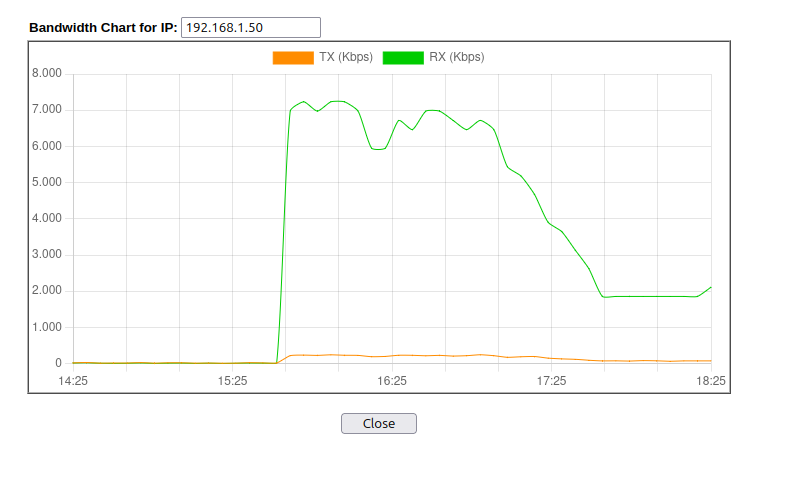
Picture it - A VPS in Manila only running chrony in the pool. Over the last 4 weeks it is doing an average of 1.2Mb/sec of outgoing NTP traffic. On the incoming side it is receiving an average of 36Mb/sec. In the last hour it has dropped 240 million incoming NTP requests from clients sending more than 8 requests per second.
Iptables rules makes them go away - Depends on your definition of “away” I guess.
As in they are not there in massive numbers:
chronyc -n clients |sort -rn -k 3,3 |head
185.95.73.69 48 21 -1 2 179 0 0 - -
91.183.19.198 45 5 3 2 0 0 0 - -
84.198.221.146 18 5 1 1 159 0 0 - -
87.64.28.85 24 4 1 4 182 0 0 - -
80.200.7.139 12 1 1 - 183 0 0 - -
Iptables does a great job. Just look at my router, where all passes.
It’s the Chrony server that does the firewalling.
This load isn’t that high, and you see they try for while and go away. For me this is acceptable.
As it’s set at 3mbit for my server, this is ok.
Found something that I don’t like from Chrony….when you didn’t enable command-ports. It still responds and send out data.
Try your own server: chronyc -h ntp.server.net
It will connect and help works. In the config:
# By default chronyd binds to the loopback interface.  Uncomment the
# following lines to allow receiving command packets from remote hosts.
#bindcmdaddress 0.0.0.0
#bindcmdaddress ::
So it should not respond in my opinion and drop the connection. But it doesn’t. version in use 4.6.1
Should it do this? If so, why? I would rather have it drop the command-request-prompt in total.
Oh, then it really makes me wonder why Chrony’s rate limiting didn’t already have the same effect.
~$ chronyc -h badeand.net
chrony version 4.8
Copyright (C) 1997-2003, 2007, 2009-2025 Richard P. Curnow and others
chrony comes with ABSOLUTELY NO WARRANTY.  This is free software, and
you are welcome to redistribute it under certain conditions.  See the
GNU General Public License version 2 for details.

chronyc> sources
506 Cannot talk to daemon
Seems it doesn’t send out data, but the error was immediate when I tried running a command. For contrast, when I pointed it at my router which doesn’t run Chrony, it took a bit longer to give the error message when I ran the command, but same error.
Well you can run help and it lists all options it has.
The client commands at the bottom work.
But my point is, when I do not want this to be bound except for local, why open it for anybody to see and try.
I think it should be closed when you don’t enable it except localhost as it states.
Tried doing that against my router, which again, doesn’t have Chrony. It still listed the help text, so that’s just client side.
Yes, I agree. The fact that I got an error immediately, without any delay, suggests it got some kind of refusal from the server rather than the silent treatment you’d expect from a closed port.
Try mine: chronyc -h ntp3.heppen.be
This is what happens:
root@server:~# chronyc -h ntp3.heppen.be
chrony version 4.6.1
Copyright (C) 1997-2003, 2007, 2009-2024 Richard P. Curnow and others
chrony comes with ABSOLUTELY NO WARRANTY.  This is free software, and
you are welcome to redistribute it under certain conditions.  See the
GNU General Public License version 2 for details.

chronyc> help
System clock:
tracking                    Display system time information
makestep                    Correct clock by stepping immediately
makestep <threshold> <updates>
                            Configure automatic clock stepping
maxupdateskew <skew>        Modify maximum valid skew to update frequency
waitsync [<max-tries> [<max-correction> [<max-skew> [<interval>]]]]
                            Wait until synchronised in specified limits

Time sources:
sources [-a] [-v]           Display information about current sources
sourcestats [-a] [-v]       Display statistics about collected measurements
selectdata [-a] [-v]        Display information about source selection
selectopts <address|refid> <+|-options>
                            Modify selection options
reselect                    Force reselecting synchronisation source
reselectdist <dist>         Modify reselection distance
offset <address|refid> <offset>
                            Modify offset correction

NTP sources:
activity                    Check how many NTP sources are online/offline
authdata [-a] [-v]          Display information about authentication
ntpdata [<address>]         Display information about last valid measurement
add server <name> [options] Add new NTP server
add pool <name> [options]   Add new pool of NTP servers
add peer <name> [options]   Add new NTP peer
delete <address>            Remove server or peer
burst <n-good>/<n-max> [[<mask>/]<address>]
                            Start rapid set of measurements
maxdelay <address> <delay>  Modify maximum valid sample delay
maxdelayratio <address> <ratio>
                            Modify maximum valid delay/minimum ratio
maxdelaydevratio <address> <ratio>
                            Modify maximum valid delay/deviation ratio
minpoll <address> <poll>    Modify minimum polling interval
maxpoll <address> <poll>    Modify maximum polling interval
minstratum <address> <stratum>
                            Modify minimum stratum
offline [[<mask>/]<address>]
                            Set sources in subnet to offline status
online [[<mask>/]<address>] Set sources in subnet to online status
onoffline                   Set all sources to online or offline status
                            according to network configuration
polltarget <address> <target>
                            Modify poll target
refresh                     Refresh IP addresses
reload sources              Re-read *.sources files
sourcename <address>        Display original name

Manual time input:
manual off|on|reset         Disable/enable/reset settime command
manual list                 Show previous settime entries
manual delete <index>       Delete previous settime entry
settime <time>              Set daemon time
                            (e.g. Sep 25, 2015 16:30:05 or 16:30:05)

NTP access:
accheck <address>           Check whether address is allowed
clients [-p <packets>] [-k] [-r]
                            Report on clients that accessed the server
serverstats                 Display statistics of the server
allow [<subnet>]            Allow access to subnet as a default
allow all [<subnet>]        Allow access to subnet and all children
deny [<subnet>]             Deny access to subnet as a default
deny all [<subnet>]         Deny access to subnet and all children
local [options]             Serve time even when not synchronised
local off                   Don't serve time when not synchronised
smoothtime reset|activate   Reset/activate time smoothing
smoothing                   Display current time smoothing state

Monitoring access:
cmdaccheck <address>        Check whether address is allowed
cmdallow [<subnet>]         Allow access to subnet as a default
cmdallow all [<subnet>]     Allow access to subnet and all children
cmddeny [<subnet>]          Deny access to subnet as a default
cmddeny all [<subnet>]      Deny access to subnet and all children

Real-time clock:
rtcdata                     Print current RTC performance parameters
trimrtc                     Correct RTC relative to system clock
writertc                    Save RTC performance parameters to file

Other daemon commands:
cyclelogs                   Close and re-open log files
dump                        Dump measurements and NTS keys/cookies
rekey                       Re-read keys
reset sources               Drop all measurements
shutdown                    Stop daemon

Client commands:
dns -n|+n                   Disable/enable resolving IP addresses to hostnames
dns -4|-6|-46               Resolve hostnames only to IPv4/IPv6/both addresses
timeout <milliseconds>      Set initial response timeout
retries <retries>           Set maximum number of retries
keygen [<id> [<type> [<bits>]]]
                            Generate key for key file
exit|quit                   Leave the program
help                        Generate this help

chronyc>
On ANY chrony server that I tried. 
Tested your, it does send data….look:
root@server:~# chronyc -h badeand.net
chrony version 4.6.1
Copyright (C) 1997-2003, 2007, 2009-2024 Richard P. Curnow and others
chrony comes with ABSOLUTELY NO WARRANTY.  This is free software, and
you are welcome to redistribute it under certain conditions.  See the
GNU General Public License version 2 for details.

chronyc> help
System clock:
tracking                    Display system time information
makestep                    Correct clock by stepping immediately
makestep <threshold> <updates>
                            Configure automatic clock stepping
maxupdateskew <skew>        Modify maximum valid skew to update frequency
waitsync [<max-tries> [<max-correction> [<max-skew> [<interval>]]]]
                            Wait until synchronised in specified limits

Time sources:
sources [-a] [-v]           Display information about current sources
sourcestats [-a] [-v]       Display statistics about collected measurements
selectdata [-a] [-v]        Display information about source selection
selectopts <address|refid> <+|-options>
                            Modify selection options
reselect                    Force reselecting synchronisation source
reselectdist <dist>         Modify reselection distance
offset <address|refid> <offset>
                            Modify offset correction

NTP sources:
I stopped, as it’s the same as mine….long list, and the bottom client-options work!
Your chrony version is more than a year old. Current one is 4.8. Might want to upgrade?
Also, doing the same on my server by calling “help” lists all commands you can use, BUT if you try to use one, it returns a 506 (denied)
Why does help output all commands even on yours, it should not connect at all?
It should not do that when you don’t bind the cmd’s to anything.
Why does this bother me, as you can reload this page real fast and it sends the same data over and over. I did notice a lot of command-packages on my server and also on the server in Leuven.
I wondered, why is it handling so many command-packets? It shouldn’t.
I wanted to bring your server down, al I have to do is ask a botnet to send this command:
chronyc help -h time-server.ddos
Then send it fast of from thousands of clients, 1 single command will spit out a lot of bytes, 10K, I do not know.
But why sending it when the sysop stated NOT to bind but localhost.
BTW, my Iptables will prevent this as it drops rapit stuff via port 123….does ratelimit help in this case?
I wonder.
When I run either “chronyc -h badeand.net” or “chronyc -h ntp3.heppen.be” i can’t connect to the remote server. So it looks to me you are good @Bas and @Badeand.
xxx@OPNsense:~ $ sudo chronyc -h badeand.net
chrony version 4.8
Copyright (C) 1997-2003, 2007, 2009-2025 Richard P. Curnow and others
chrony comes with ABSOLUTELY NO WARRANTY. This is free software, and
you are welcome to redistribute it under certain conditions. See the
GNU General Public License version 2 for details.chronyc> clients
506 Cannot talk to daemon
chronyc>
Type ‘help’ instead…..
I’m on version 4.3  So that information didn’t come from my server.
Seems to me that the help command is client side. That is, it’s not the server that provides the output.
When i chronyc -h ntp3.heppen.be it indeed responds with a list of commands you can use. But I think it is the local chrony instance providing this response:
Blockquote
chronyc> help
System clock:
tracking Display system time information
makestep Correct clock by stepping immediately
makestep
Configure automatic clock stepping
maxupdateskew Modify maximum valid skew to update frequency
waitsync [ [ [ []]]]
Wait until synchronised in specified limits
Time sources:
sources [-a] [-v] Display information about current sources
…
Exactly what im thinking.
Indeed i’m running chrony 4.8. So local chrony instance is providing the answer.